Egy hely, ahol minden beállítás él
az igazságforrás: hogyan költöztek a beállítások fájlokból adatbázisba, és mit hagytam szándékosan kint
the source of truth: how settings moved from files into a database, and what I left outside on purpose
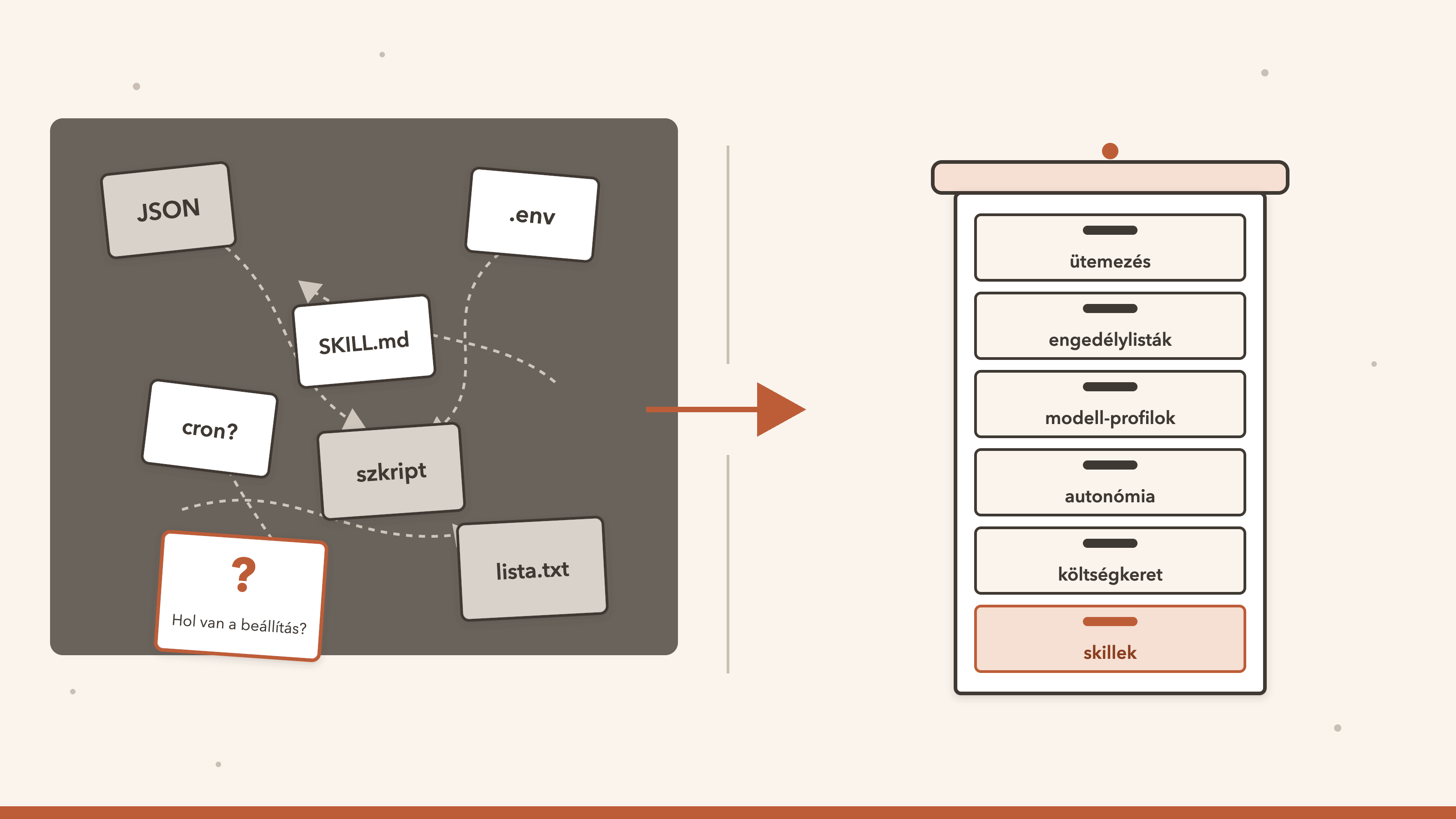
Röviden, előismeret nélkül. Egy rendszer beállításai azt mondják meg, hogyan viselkedik: mikor fut egy feladat, melyik modell válaszol, mely hálózati címekre szabad kapcsolódni, ki mit kap. Az eredeti Marveenből örökölt módon ezek nálam is sokáig fájlokban és környezeti értékekben éltek szerte a gépen, és nem lehetett megmondani, melyik az érvényes, ki változtatta meg, és mi volt előtte. Ezeket nagyrészt egyetlen adatbázisba költöztettem, néhány dolgot szándékosan kint hagytam, és közben néhányszor elrontottam. Az adatbázisban él a skillek és a skill factory is, a telemetria, a mérés és a jóváhagyás új rétege pedig a többbérlős működés alapja. Erről szól ez a rész.
An English version of this article follows below. Jump to the English version.
„Hol van a beállítás?” „Nem tudom. Valahol egy JSON-ban, ha jól emlékszem.” Ezt a mondatot nem engedi meg egy auditor.
A harmadik rész végén azt írtam, hogy a szabály, amely megmondja, ki mit tehet, maga is egy beállítás, és egy szabály annyit ér, amennyire megbízható az a hely, ahol tárolják. Ez a rész erről a helyről szól. Úgy írtam meg, hogy a korábbi részek nélkül is érthető legyen: elég tudni, hogy van egy rendszerem, amely ügynököket futtat, és hogy ezek működését sok kis beállítás szabja meg.
A sorozat kérdése változatlan: mit ad egy kisvállalkozásnak vagy egy nagyobb cégnek az, hogy az eredeti személyes asszisztenst a saját rendszeremmé fejlesztettem tovább? A beállítások terén a válasz az, hogy egy cég nem azt kérdezi, mit tud a rendszer, hanem azt, hogy ha valami másképp viselkedik, mint tegnap, ki és mikor változtatott rajta. Az eredeti ezt a kérdést nagyrészt fájlok átnézésével válaszolja meg. Az enyémben a legtöbb beállítás táblában él, bérlő-azonosítóval és változásnaplóval. A végén táblázatban vetem össze a kettőt, és leírom azt is, hol maradt a helyzet kínos.
1. Hol van a beállítás?
Egy ügynökökből álló rendszerben sokféle beállítás van. Mikor fut egy ütemezett feladat. Melyik modellre lépjen vissza az ügynök, ha az elsődleges nem válaszol. Mely külső címekre szabad kapcsolódni. Mekkora költségkeretet kap egy ügynök. Mennyire önállóan cselekedhet, és mihez kell előbb jóváhagyás. Az eredeti Marveenből örökölt módon ezek egy része fájlokban és környezeti értékekben élt: egy része egy JSON-ban, egy része egy rejtett fájlban, egy része egy indító szkriptben.
Ez egyetlen ember és egyetlen gép esetén működik, mert az illető fejből tudja, mi hol van. Egy cégnél öt dolog hiányzik belőle. Nincs verzió: nem lehet megmondani, mi volt a beállítás múlt héten. Nincs bérlő-szűrés: nem lehet úgy lekérni egy ügyfél beállításait, hogy a másikét ne lássam. Nincs napló arról, ki változtatta meg. Mentés visszaállításakor a fájlok eltérhetnek egymástól és az adatbázistól. A felületről pedig nem szerkeszthető, mert egy fájlba írni úgy nem lehet, hogy közben jogosultságot is ellenőrizzek.
Ez az öt hiányosság főleg az auditálhatóságot és a bérlő-szűrést érintik, de a váltásnak volt egy második fő oka is: az üzemeltethetőség és a skálázhatóság. Egy adatbázis egy helyen menthető és visszaállítható, több példány vagy gép ugyanazt látja belőle, felülről kezelhető, és előkészíti a későbbi adatbázis-cserét, amelyre a sorozat 7. részében térek vissza.
A célom ezért az volt, hogy minden módosítható beállításnak és futás közbeni állapotnak legyen egy helye: az adatbázis, bérlő-azonosítóval és változásnaplóval. Fájl csak három dolognak maradjon: a titkoknak, az indításhoz szükséges értékeknek és a kódban verziózott tartalomnak. A 7. pont ennél hosszabb listát ad, és megmondja, miért; hogy mennyire sikerült betartanom, ott derül ki.
Mit jelent ez egy cégnek. Az auditor első kérdése nem az, hogy jó-e a beállítás, hanem az, hogy honnan tudod, hogy ez az érvényes, és ki változtatta meg utoljára. Ha a válasz az, hogy „megnézem a fájlokat”, az gyenge válasz. Ha a válasz egy lekérdezés, amely megmutatja az értéket, a változtatás idejét és a változtató azonosítóját, az erős. A megfelelést ez nem garantálja, de a bizonyítékgyűjtést olcsóbbá teszi.
2. Mi költözött, és mi maradt
A mérés napján (2026. október 27.) tucatnyi beállítás-csoport élt az adatbázisban: a kimenő hálózati hozzáférések engedélylistája, az ütemezés és az ütemezés állapota, az ügynökök beállításai és állapota, a rendszerbeállítások a modell-tartalékkal együtt, az autonómia-szintek, a modell-profilok, a társrendszerekkel való összekötés (föderáció) beállítása, a költségkeretek, a csatorna-hozzáférések, a titok-kötések (csak az, hogy melyik titok melyik ügynökhöz tartozik, maga a titok nem) és a skillek kísérő fájljai. Az első nagy hullám egyetlen napon, 2026. szeptember 29-én ment át, a többi azóta, egyenként. A telepítő is elkészült: a fejlesztés szerint nulláról indít, kezdő bérlővel és működő beállításokkal, a titkos értékeket pedig maszkolja (egy friss, nulláról indított telepítést ehhez a cikkhez nem próbáltam ki).
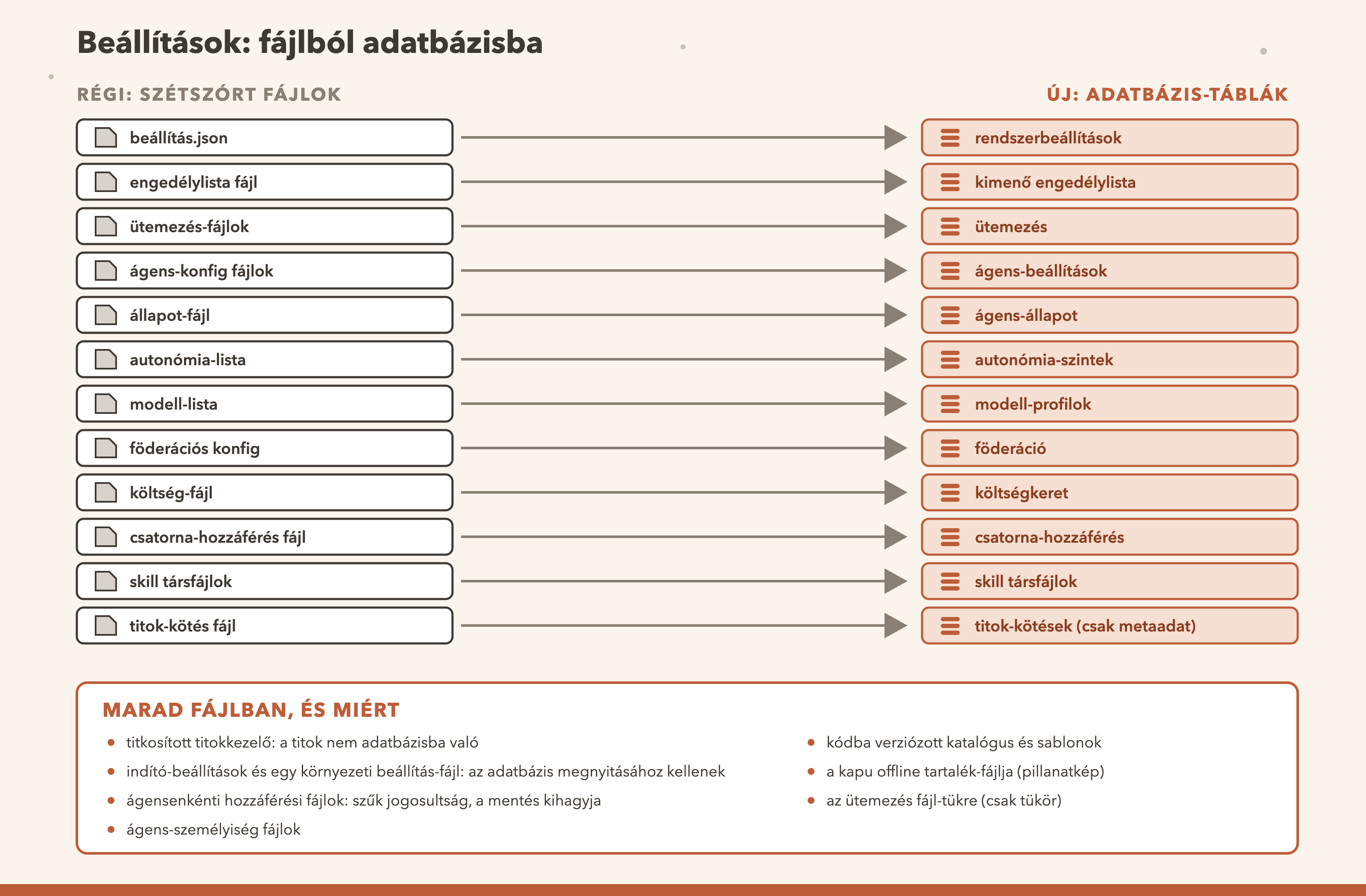
Az átköltözés nem egyszerre történt. Minden csoportot külön hoztam át: létrehoztam a táblát, egyszeri betöltéssel átvettem a régi fájl tartalmát, az olvasást átirányítottam, a fájlt pedig elavultnak jelöltem és archiváltam, hogy ne az legyen az igazság. A Beállítások képernyőn mintegy hetven beállítás olvasható és módosítható, jogosultsághoz kötve, és minden módosítás bekerül a változásnaplóba a régi értékkel, az újjal és a változtató azonosítójával. A titkos beállításoknál az érték maszkolva szerepel a naplóban.
A skillek és a skill factory is adatbázisban élnek. A skill itt egy újrafelhasználható munkaleírás, amelyet az ügynökök használnak. A skillek tartalma egy táblában van (ma 187 sor), a kísérő fájljaik és a használatuk naplója külön táblákban.
A lemezen lévő SKILL.md fájl generált gyorsítótár: az adatbázis-sorból íródik ki, és ha valaki a fájlt szerkeszti, egy hook írja vissza a sorba. A skill factory saját skilljének is van sora, új skillt és módosítást ugyanaz a hívás hoz létre. Az SQL-tárolás augusztus 31-én indult, szeptember 30. óta az írás az adatbázisból indul, és a fájl újragenerálása alapból be van kapcsolva.
A többbérlős működés alapja: telemetria, mérés és jóváhagyás. Az alap-táblák (token-használat, nyomkövetés, beszélgetésnapló, jóváhagyások) az eredeti projektben is megvannak; a hangsúly azon a rétegen van, amelyet én építettem rájuk.
A telemetria-táblák nagy részén bérlő-azonosító van (október 8. óta), így az adat bérlőnként szűrhető. Mérő- és audit-táblák követik a jogosultsági szabályok döntéseit, a közös token használatát, valamint az ügynökök és a hook-ok működését. A jóváhagyásoknál új a csak-ember kategória: az eredetiben nincs, nálam egy a kódban rögzített alsó korlát és külön oszlopok adják, hogy az ilyen jóváhagyást ügynök ne adhassa meg. A kikényszerítése egy jelzőn múlik, amely az élő szerveren be van kapcsolva.
3. A betöltés és a tervbe égetett kezdőérték
Amikor egy beállítás fájlból táblába költözik, kétféleképpen lehet kitölteni a táblát. Vagy a régi fájl tartalmát egyszer betöltöm, vagy a kezdőértéket beleégetem a migrációba, a kód mellé verziózva. Az első a meglévő telepítés tényleges állapotát viszi át, a második arra válaszol, hogy mi legyen alapból. Nem ugyanaz, és nem mindegy, melyiket választom.
Három csoportnál betöltést használtam: a modell-visszalépésnél, annál, hogy mely ügynököknek kell futniuk, és a felületi terminál-bevitel engedélyénél. Kettőnél égetett kezdőértéket: a kimenő hálózati engedélylistánál és az autonómia-szinteknél. A modell-visszalépésnél a legjobban érthető az indok: a tartalék-lánc első elemének annak a modellnek kell lennie, amely ténylegesen fut, a terminál-bevitel alapértékének pedig egy friss telepítésen ki kell maradnia. Ezt egy beégetett érték nem tudja, mert nem tudja, melyik gépen fut.
Így is elrontottam. A modell-visszalépésnek három beállítása van. Ha ezek közül csak egyet mentettem, a rendszer a másik kettőt is elmentette, pedig azokhoz nem nyúltam. Így a gép által kiszámolt alapérték úgy maradt meg, mintha én választottam volna. Ha később jobb alapérték érkezik, az már nem lépett volna életbe, mert a rendszer a régi, elmentett értéket használta volna tovább. A tanulság egy mondatban: egy alapérték ne váljon csendben döntéssé. A javítás után a rendszer csak azt menti, amit ténylegesen megváltoztattam, és a felület is csak a szerkesztett mezőt küldi el.
A beégetett kezdőértéknek van egy másik csapdája is: pillanatfelvétel. Az engedélylista migrációja a megírás napján 199 címet égetett be, és utólag még hét hírforrás-címet kellett pótolni, amely a fájlban megvolt, de a pillanatfelvételből kimaradt. Egy már lefutott migrációt nem szerkesztek, ezért a pótlás külön migráció lett. Hozzáteszem, hogy a mai élő táblában 158 sor származik a migrációból, nem 206. A különbség okát nem vizsgáltam meg, ezért azt sem állítom, hogy a beégetett lista hiánytalanul megvan.
4. Amikor egy régi alapérték kikapcsolta az ütemezőt
Az ütemezés az adatbázisban az igazság, a fájl csak tükör. A feladat leírása, az időzítés és az, hogy engedélyezett-e, a táblában él, és egy 15 másodpercenként ellenőrző futtató olvassa. A parancs-típusú feladatok nyelvi modell nélkül, aszinkron futnak.
Egy este ezt a rendet megsértettem. Egy kódváltozás azt feltételezte, hogy a feladatok leíró fájljában lévő „engedélyezett” mező érvényes marad, amikor a feladatot az adatbázisba viszem. Nem maradt. A fájlokban ott volt egy régi, jelentés nélküli „kikapcsolt” alapérték, amely sosem volt valódi kapcsoló, mert a tényleges kapcsoló az adatbázis-sorban élt. A telepítés utáni első olvasáskor ez a csökevény felülírta az engedélyezett sorokat, és mind a 24 akkori feladatot letiltotta. Körülbelül tíz órán át nem futott semmi (a hibás változtatás 22:25-kor került be, a visszaállítás másnap 08:34-kor; a tényleges kezdet a telepítés ideje, amelyet nem ismerek), és nem maradt nyom arról, hogy miért.
A javítás visszaállította a korábbi viselkedést: az engedélyezett állapotot kizárólag az adatbázis-sorból olvassa. Utána három védelmet adtam hozzá. Minden esedékes, de visszatartott futás naplózódik a visszatartás okával, a tömeges letiltás pedig egyszer riaszt. A nyomkövető alapvonala az adatbázisból indul, így újraindítás után is észleli az eltérést. A tükör „engedélyezett” mezőjét pedig óránként újraírom az adatbázisból, egy irányban, mert a tükör 17 fájlon hamisra sodródott, miközben az adatbázis engedélyezettet mondott.
Ez a tükör egy ideig nem volt rendben. A táblában 25 ütemezés volt, a fájlrendszerben 32 könyvtár, és csak 23 volt azonos nevű. A „fájl csak tükör” elv miatt az eltérés nem volt hiba, ezért a takarítás halasztódott, de a cikk kedvéért elvégeztem: kitöröltem a nyolc tesztmaradvány könyvtárát és egy már kiváltott régi feladatét (a link-gráf karbantartását azóta egy másik, modell nélkül futó éjszakai feladat végzi). Ma 25 adatbázis-sor és 23 tükör-könyvtár van, mind azonos nevű. A két könyvtár nélküli sor parancs-típusú, modell nélkül futó feladat, amelynek nem kell tükör.
5. A kapu, amely a folyamaton kívül fut
A kimenő hálózati kapu nem a dashboard folyamatában fut. Egy kis beépülő szkript (hook), amely minden eszközhívásnál új folyamatként indul, ezért nem tudja megnyitni az adatbázist, és más módon kell beállításhoz jutnia. Ha a kapu nem éri el a listát, két rossz lehetőség van: mindent átenged, vagy mindent letilt. Ezért itt az a kérdés, merre hibázik.
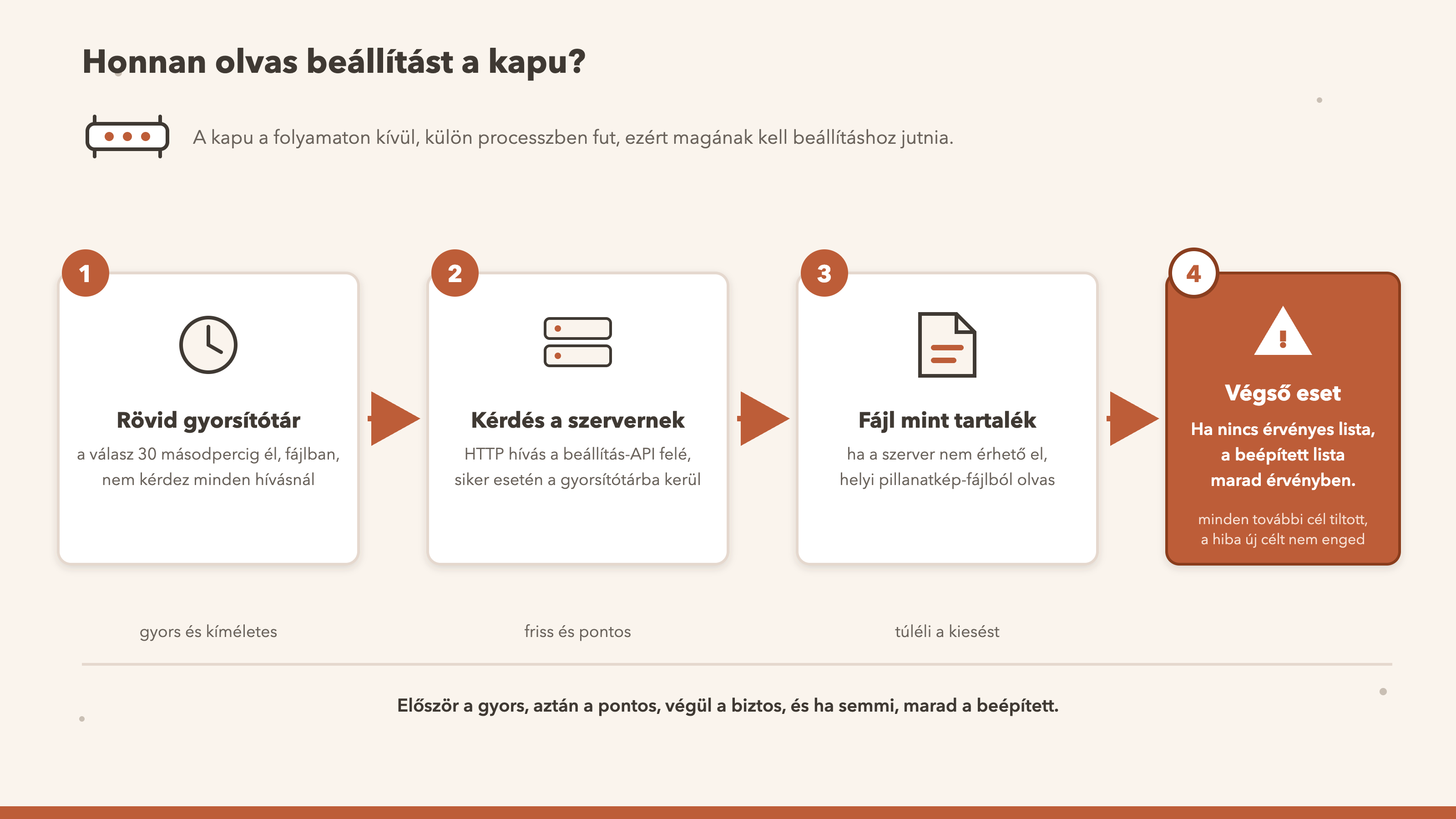
A sorrend ez. Először egy friss, 30 másodpercnél nem régebbi lemez-gyorsítótár. Ha nincs, élő kérdés a szervernek, és a válasz bekerül a gyorsítótárba. Ha a szerver nem érhető el, egy helyi tartalék-fájl. Ha egyik sem ad érvényes listát, a kapuba beépített lista marad érvényben, és minden további célt tilt: a hiba új célt nem enged. A gyorsítótár időbélyegét ellenőrzöm is, mert egy kézzel beírt, távoli jövőbeli időpont különben örökre frissnek látszatna.
Ennek az ára a tartalék-fájl. A szerver már nem írja, ezért a mai példány egy október 2-i pillanatfelvétel: 161 címet tartalmaz szemben az adatbázis 172-ével (a két lista tartalmát nem vetettem össze, csak a számot). A tartalék-ágon a kapu tehát a darabszám alapján valószínűleg szigorúbb, mint a tábla: ha a szerver kiesik, egy újabban engedélyezett cím tiltva lenne. Vállalható, mert a hiba iránya a tiltás felé mutat, de nem szépség.
6. A „biztos” migráció, amely nem futott le
A rendszer több folyamata ugyanazt az adatbázist nyitja meg. A csatorna-összekötő saját kapcsolattal éri el. Ha egy indítási versenyben ő hozza létre az üzenetek táblát, mielőtt a dashboard migrációi lefutottak volna, a tábla egy régebbi sémával jön létre, néhány oszlop nélkül. A későbbi, biztosnak hitt migrációk egy ilyen adatbázison elbuktak volna.
A javítás kettős. Egy külön migráció pótolja az oszlopokat, a migráció-futtató pedig megtanulta a következőt: ha egy migráció-fájl kizárólag oszlop-hozzáadásokból áll, utasításonként fut, és a „ez az oszlop már megvan” hibát átugorja. Vegyes migrációra ez nem érvényes, mert ott egy átugrott utasítás nem ismételhető műveletet is elnyelhetne. Erre azért kellett a futtatóban megoldást írni, mert az SQLite nem ismeri az „adj hozzá oszlopot, ha még nincs” alakot.
Ugyanebből a fajtából van egy második tanulság. Két korábbi migrációban a keresőindex-táblák triggerei miatt egy tábla átnevezése és újraépítése összeomlási hurkot okozott, ezért azóta a migrációkban az átnevezés tilos, és ezt egy későbbi migráció fejléce név szerint ki is mondja.
7. Amit szándékosan kint hagytam, és ami véletlenül
A cél nem az volt, hogy minden az adatbázisban legyen, hanem az, hogy minden módosítható beállításnak legyen egy helye. Szándékosan fájlban maradt:
- A titkosított titokkezelő. A mesterkulcs az operációs rendszer kulcstartójában van, ennek hiányában fájlban. Az adatbázisban csak a kötés leírása van (melyik titok melyik környezeti változóhoz tartozik), érték soha. Ha a titok a táblában lenne, a mentéssel, a naplóval és az exporttal együtt utazna a többi adattal.
- Az indító-beállítások és a környezeti beállítás-fájl. Az adatbázis megnyitásához kellenek, ezért nem lehetnek az adatbázisban.
- Az ügynökönkénti hozzáférési token-fájlok és gép-kulcsok. Szűk jogosultsággal élnek, a mentés a hozzáférési token-fájlokat kihagyja. A tábla csak a metaadatukat tartja.
- Az ügynökök személyiség- és beállítás-fájljai. Egy ügynök saját modell-választása ma is itt él.
- A katalógus és a sablonok. A kódban verziózva élnek, és telepítéskor kerülnek táblába.
- A kapu tartalék-fájlja (lásd az 5. pontot) és az ütemezés fájl-tükre (lásd a 4. pontot): ezek nem források, csak másolatok.
A társrendszer-összekötés beállítása is fájlban volt, és egy ideig ott is maradt. 2026. szeptember 29. óta egyetlen JSON-dokumentumként az adatbázisban él. Nyers dokumentumként tároltam, nem táblákra bontva, hogy egy érvénytelen bejegyzés is bájtra azonosan visszaíródjon, és a kikapcsolás veszteségmentes legyen. A mérés napján a kapcsoló ki volt, párosított társrendszer nem volt.
Most a kínos rész. A harmadik részben leírtam a kaput, amely előbb csak figyelt, és csak utána tiltott. Az, hogy tilt vagy csak figyel, egy kapcsoló. Ez a kapcsoló a mérés napján még a környezeti beállítás-fájlban élt, nem az adatbázisban. Nem volt a Beállítások képernyőn, a változása nem került a változásnaplóba, a felületen nem volt rajta jogosultság-ellenőrzés, és módosításához újraindítás kellett. Ugyanez igaz a „kinek a nevében történt” kikényszerítés kapcsolójára, amely alapból még csak figyelt. Éppen az a két beállítás, amelyeken a szabályok megbízhatósága múlik, élt tehát a legkevésbé auditálható helyen. Ezért ez a kettő költözött utolsónak: a tiltás-kapcsoló és a „kinek a nevében történt” kapcsoló is átkerült az adatbázisba, rendszerbeállításként. Ott látszik a Beállítások képernyőn, a változása bekerül a változásnaplóba, és a módosítása jogosultsághoz kötött. A tiltás lazítását úgy terveztem, hogy csak bejelentkezett emberi rendszergazda végezhesse (ezt egy külön védelmi kapcsoló kényszeríti ki), és ha a kapcsoló értéke nem olvasható, a kapu a tiltó oldalra esik. A „kinek a nevében történt” kikényszerítés pedig már nem csak figyel, hanem tilt. Szép fordulat, de nem büszkeség: a két legfontosabb kapcsolót hagytam a legvégére, és a mérés napján még kint voltak.
8. Számokban
Itt is csak azt mérem, ami ellenőrizhető, és mindegyik mellé odaírom a módszert és a korlátját.
Mit mér: a számozott migráció-fájlok számát az adatbázis-séma története szerint; október 1-jén 65 volt, tehát 26 nap alatt 20 jött. A javító vagy pótló jellegűeket külön jelölöm, és ezek nem új funkciók. Mit nem mér: a javító besorolás nevek és fejlécek alapján kézi, ezért „kb.”; egy sorszám kimarad, az okát nem vizsgáltam. Mérve: 2026. október 27.
Mit mér: azt a 12 beállítás- és állapotfájlt, amelyet szeptember 29-én egyetlen napon vezettem ki, és archívumban őrzöm. Mit nem mér: az „előtte” és „utána” arányt, mert az „előtte” fájlok teljes száma egyetlen számmal nem rekonstruálható. A tárolóban a mérés napján még 17 felső szintű JSON-fájl állt, ebből 12 aktív és legfeljebb 5 árva vagy egyszeri; a „hány fájl említ egy .json nevet” módszert szándékosan nem használom, mert a kivezetett nevek a betöltő kódban és a tesztekben megmaradnak. Mérve: 2026. október 27.
Mit mér: a Beállítások képernyő regiszterének kulcsait és a változásnapló sorait. Mit nem mér: azt, hogy a beállítások jók; azt, hogy hányszor változott valami (a napló csak a beállítás-írás útját látja). Egy kulcs csak környezeti értékként él, mert egy táblába írt sort senki sem olvasna. Mérve: 2026. október 27., a két kapu-kapcsoló áthelyezése előtt.
Mit mér: az ütemezések számát a táblában és a fájlrendszeri tükör könyvtárainak számát; mind a 23 könyvtár azonos nevű egy sorral, két sornak nincs könyvtára (parancs-típusú, modell nélkül futó feladatok, nekik nem kell tükör). A takarítás előtt 32 könyvtár volt. Mit nem mér: a tükör tartalmának egyezését. Mérve: 2026. október 27., a takarítás után.
9. Az eredeti és az én rendszerem
Összevetést csak ott írok, ahol ellenőriztem. Az „eredeti” oszlop az eredeti projekt fejlesztési ágának 2026. október 27-i állapota: a keresett fogalmak (migráció-futtató, beállítás-tábla, a konkrét táblák és fájlnevek) jelenlétét vagy hiányát néztem a forrásfájlokban. Egy más helyen vezetett megoldásról nem tudok, és az eredeti is fejlődik, ezért ez pillanatfelvétel. A „rendszerem” oszlop a megjelenés napjának állapota.
| Téma | Az eredeti | A rendszerem |
|---|---|---|
| Számozott, verziózott migráció-futtató | ○ nincs: a séma egy fájlban épül, „hozd létre, ha nincs” és oszlop-hozzáadások sorozatával | ✓ éles: számozott migrációk, séma-verzió tábla, tűrő oszlop-hozzáadás |
| Beállítás-képernyő és regiszter | ◐ megvan: regiszter és beállítás-tár | ✓ éles: 74 kulcs (az áthelyezés előtti mérés szerint), adatbázisba író út, változásnapló; a két kapu-kapcsoló is a rendszerbeállítások között él |
| Beállítások adatbázistáblában (rendszerbeállítások, felülírások) | ○ nincs: a felülírások fájlban élnek | ✓ éles: rendszerbeállítás-tábla, feloldási sorrend: adatbázis, titok-fájl, környezeti érték |
| Kimenő hálózati engedélylista | ○ fájl-alapú | ✓ éles: táblában, a kapu gyorsítótárral és tartalék-fájllal; a tartalék pillanatfelvétel |
| Autonómia-szintek, modell-profilok, költségkeret, ügynök-beállítások és -állapot | ○ fájlokban élnek | ✓ éles: mind táblában |
| Társrendszer-összekötés beállítása | ◐ a funkció megvan, a beállítás fájlban él | ✓ éles: a beállítás táblában, ma kikapcsolva, párosított társrendszer nincs |
| Ütemezés mint adatbázis-igazság | ◐ van ütemezés-tábla és nyilvántartás | ◐ részben: felülvizsgálati kapu, bérlő, futás-eredmény; a fájl-tükör sodródik |
| Munkadokumentumok adatbázisban | ○ nincs | ✓ éles: 204 munkadokumentum kereshetően |
| Skillek és a skill factory adatbázisban | ○ nincs: nincs skill-tábla (csak használati napló), a skillek fájlok | ✓ éles: 187 skill táblában, a kísérő fájlok és a használati napló külön táblákban, a SKILL.md generált másolat, a skill factory is ezen az úton ír |
| A többbérlős működés alapja: telemetria, mérés, jóváhagyás | ◐ a telemetria- és a jóváhagyás-táblák megvannak; bérlő-azonosító, mérő- és audit-táblák és csak-ember kategória nincs | ✓ éles: bérlő-azonosító a telemetria-táblák nagy részén, mérő- és audit-táblák, csak-ember jóváhagyási kategória (ügynök nem adhatja meg), élesben bekapcsolva |
| Titkosított titokkezelő | ✓ megvan | ✓ éles: itt nincs különbség az eredetihez képest |
Mit jelent ez egy cégnek. A ○ sorok azok, ahol egy cég a beállításoknál először kérdez: honnan tudom, mi az érvényes érték, és ki változtatta meg. Az eredeti itt fájlokat mutat, én lekérdezést. A skillek sorában ez azt jelenti, hogy egy skill nálam adatbázis-sor, a fájl csak generált másolat. A ◐ sorokban az alapelv az eredetiben is megvan, én a bérlő-azonosítót és a naplót adtam hozzá. Az utolsó sor mutatja a határt: a titkosított titokkezelő az eredetiben is megvan, és nem állítom magamról az ellenkezőjét.
10. Mit nem old meg ez
Mit nem old meg ez. Egy beállítás az adatbázisban még nem jó beállítás: a hely megbízhatóbb, az érték attól még lehet rossz. A betöltés egyszeri, a régi fájlok félrevezető nyomként megmaradhatnak (a tárolóban ma is van legfeljebb öt árva vagy egyszeri JSON-fájl). A kint hagyott részekre nincs változásnapló. A fájl-tükör sodródik. A kapu tartalék-ágán a lista elavult pillanatfelvétel, és a darabszám alapján valószínűleg szigorúbb, mint a tábla. A futásidejű állapot egy része a kivezetés után is fájlban él. Az „előtte” fájlszámot nem tudom egyetlen számmal megadni. Független átvilágítás ezt a részt nem érte.
11. Ami következik
A sorozat kérdése az, mit ad egy kisvállalkozásnak vagy egy nagyobb cégnek ez a rendszer az eredetihez képest. A beállítások terén a válasz három dolog: egy hely az igazságnak, bérlőnként szűrhető és naplózott változások, és egy telepítő, amely nulláról, működő beállításokkal indul. Mindegyiknek megvannak a korlátai, ezeket a 10. pontban leírtam.
Ha minden egy helyen van, látnom is kell, mi történik vele. Annyit tudni, hogy egy beállítás értéke mi, kevés, ha nem látom, mit csinált a rendszer ezzel az értékkel. Ezért a következő rész arról szól, hogyan látom, mit csinál a rendszer.
Mit hagynál kint az adatbázisból, és mit vinnél még be? Egy rövid javaslat elég. Ha hibát látsz, ne tegyél közzé kihasználható részletet. Emailben vagy LinkedInen privátban keress meg (info@jonasgergo.hu, LinkedIn).
English version
In brief, for readers with no background. A system's settings say how it behaves: when a task runs, which model answers, which network addresses it may reach, who gets what. As inherited from the original Marveen, in my system these also lived for a long time in files and environment values scattered across the machine, and nobody could say which one was valid, who had changed it, or what it had been before. I moved most of them into a single database, deliberately left a few outside, and got a number of things wrong along the way. The skills and the skill factory live in the database too, and the new layer of telemetry, measurement and approvals is the foundation of multi-tenant operation. This part is about that.
“Where is the setting?” “I don’t know. Somewhere in a JSON file, if I remember rightly.” An auditor will not accept that sentence.
At the end of the third part I wrote that the rule that says who may do what is itself a setting, and that a rule is only as good as the place where it is stored. This part is about that place. I wrote it so that it can be read without the earlier parts: all you need to know is that I have a system that runs agents, and that many small settings govern how they behave.
The question of the series is unchanged: what does a small business or a larger company gain from the fact that I developed the original personal assistant further into my own system? For settings, the answer is that a company does not ask what the system can do, but who changed something, and when, if it behaves differently from yesterday. The original answers that question largely by going through files. In mine most settings live in tables, with a tenant identifier and a change log. At the end I compare the two in a table, and I also write down where things are still awkward.
1. Where is the setting?
A system made of agents has many kinds of setting. When a scheduled task runs. Which model an agent falls back to if the primary one does not answer. Which external addresses it may connect to. How large a cost budget an agent gets. How independently it may act, and what needs approval first. As inherited from the original Marveen, some of these lived in files and environment values: part in a JSON file, part in a hidden file, part in a start-up script.
That works for one person on one machine, because the person knows from memory what is where. In a company, five things are missing. There is no version: you cannot say what the setting was last week. There is no tenant filtering: you cannot fetch one customer’s settings without seeing another’s. There is no record of who changed it. When a backup is restored, the files can drift from each other and from the database. And it cannot be edited from the interface, because you cannot write to a file and check permissions in one step.
These five gaps are mostly about auditability and tenant filtering, but the move had a second main reason: operability and scalability. A database can be backed up and restored in one place, several instances or machines see the same thing in it, it can be managed from above, and it prepares the ground for a later change of database, which I come back to in part 7 of the series.
So my aim was that every editable setting and every piece of runtime state should have one home: the database, with a tenant identifier and a change log. Files would remain for only three things: secrets, values needed to start up, and content versioned in the code. Section 7 gives a longer list than that and says why; how well I kept to the rule becomes clear there.
What this means for a company. An auditor’s first question is not whether the setting is right, but how you know this is the valid one and who changed it last. If the answer is “I’ll look through the files”, that is a weak answer. If the answer is a query that shows the value, the time of the change and the identifier of whoever made it, that is a strong one. It does not guarantee compliance, but it makes gathering evidence cheaper.
2. What moved and what stayed
On the day I measured (27 October 2026) a dozen groups of settings lived in the database: the allowlist of outbound network access, the schedule and its state, the settings and state of the agents, the system settings including the model fallback, the autonomy levels, the model profiles, the settings for linking with partner systems (federation), the cost budgets, the channel access records, the secret bindings (only which secret belongs to which agent, never the secret itself) and the companion files of skills. The first big wave went across in a single day, 29 September 2026, and the rest has followed one by one. The installer is also done: according to the development it starts from zero with a starter tenant and working settings, and masks the secret values (I did not run a fresh install from zero for this article).
The move did not happen all at once. I moved each group separately: I created the table, took over the contents of the old file with a one-off backfill, redirected reading, and marked the file as deprecated and archived it, so that it would no longer be the source of truth. About seventy settings can be read and changed on the Settings screen, tied to permissions, and every change goes into the change log with the old value, the new one and the identifier of whoever made it. For secret settings the value is masked in the log.
Skills and the skill factory also live in the database. A skill here is a reusable work description that the agents use. The content of the skills is in one table (187 rows today), their companion files and the log of their use in separate tables.
The SKILL.md file on disk is a generated cache: it is written out from the database row, and if someone edits the file, a hook writes it back into the row. The skill factory’s own skill has a row too, and a new skill and a change are made by the same call. SQL storage started on 31 August, since 30 September writing starts from the database, and regenerating the file is switched on by default.
The foundation of multi-tenant operation: telemetry, measurement and approvals. The base tables (token usage, tracing, conversation log, approvals) exist in the original project too; the emphasis is on the layer I built on top of them.
Most of the telemetry tables carry a tenant identifier (since 8 October), so the data can be filtered by tenant. Measurement and audit tables follow the decisions of the permission rules, the use of the shared token, and the operation of the agents and the hooks. For approvals the new thing is the human-only category: the original does not have it, and in my system a lower limit fixed in the code plus separate columns mean that an agent cannot give such an approval. Enforcing it hangs on a flag, which is switched on on the live server.
3. Backfilling versus a baked-in default
When a setting moves from a file to a table, the table can be filled in two ways. Either I load the contents of the old file once, or I bake the starting value into the migration, versioned alongside the code. The first carries over the actual state of an existing installation; the second answers the question of what the default should be. They are not the same, and it matters which one I choose.
For three groups I used a backfill: the model fallback, which agents should be running, and the permission for typing into the terminal from the interface. For two I used a baked-in default: the outbound network allowlist and the autonomy levels. The reasoning is clearest for the model fallback: the first element of the fallback chain must be the model that is actually running, and the default for terminal input must stay off on a fresh installation. A baked-in value cannot know that, because it does not know which machine it will run on.
I still got it wrong. The model fallback has three settings. If I saved just one of them, the system saved the other two as well, although I had not touched them. That left a default the machine had calculated in place as if I had chosen it. If a better default came along later, it would not have taken effect, because the system would have kept using the old, saved value. The lesson in one sentence: a default should never quietly turn into a decision. After the fix the system saves only what I actually changed, and the interface sends only the field that was edited.
A baked-in default has another trap: it is a snapshot. The migration for the allowlist baked in 199 addresses on the day it was written, and seven news-source addresses had to be added afterwards, because they were in the file but missed the snapshot. I do not edit a migration that has already run, so the addition became a migration of its own. I should add that in today’s live table 158 rows originate from the migration, not 206. I have not looked into the reason for the difference, so I do not claim that the baked-in list is fully present.
4. When an old default switched the scheduler off
In the database, the schedule is the source of truth and the file is only a mirror. The description of the task, its timing and whether it is enabled live in the table, and a runner that checks every 15 seconds reads them. Command-type tasks run asynchronously, without a language model.
One evening I broke this arrangement. A code change assumed that the “enabled” field in a task’s description file would stay valid when I moved the task into the database. It did not. The files contained an old, meaningless “disabled” default that had never been a real switch, because the real switch lived in the database row. On the first read after the installation, this leftover overwrote the enabled rows and disabled all 24 tasks at the time. For about ten hours nothing ran (the faulty change was merged at 22:25 and the revert at 08:34 the next morning; the actual start was the time of the installation, which I do not know), and no trace was left of why.
The fix restored the earlier behaviour: the enabled state is read only from the database row. I then added three safeguards. Every occurrence that is due but held back is logged with the reason, and a mass disabling raises one alert. The tracker’s baseline starts from the database, so it notices the discrepancy even after a restart. And I rewrite the mirror’s “enabled” field from the database every hour, in one direction, because the mirror had drifted to false on 17 files while the database said enabled.
For a while the mirror was not in order. The table held 25 schedules, the file system had 32 directories, and only 23 of them shared a name. Because the file is only a mirror, the discrepancy was not an error, so the cleanup was put off, but I did it for the sake of this article: I deleted the eight test-leftover directories and the directory of an old task that had since been replaced (the link graph is now maintained by another nightly task that runs without a model). Today there are 25 database rows and 23 mirror directories, all with matching names. The two rows without a directory are command-type tasks that run without a model, and they do not need a mirror.
5. The gate that runs outside the process
The outbound network gate does not run inside the dashboard process. It is a small hook script that starts as a new process on every tool call, so it cannot open the database and has to get its settings another way. If the gate cannot reach the list, there are two bad options: let everything through, or block everything. So the question here is which way it fails.
The order is this. First a fresh disk cache, no more than 30 seconds old. If there is none, a live request to the server, and the answer goes into the cache. If the server cannot be reached, a local fallback file. If none of them yields a valid list, the list built into the gate stays in force and every other destination is refused: an error never lets a new destination through. I also check the cache’s timestamp, because a hand-written timestamp far in the future would otherwise look fresh forever.
The price of this is the fallback file. The server no longer writes it, so today’s copy is a snapshot from 2 October: it holds 161 addresses against the database’s 172 (I did not compare the contents of the two lists, only the count). On the fallback path the gate is therefore, judging by the count, probably stricter than the table: if the server goes down, a recently allowed address would be refused. I can live with that, because the error points towards refusal, but it is not pretty.
6. The “safe” migration that did not run
Several processes of the system open the same database. The channel connector reaches it over its own connection. If, in a start-up race, it creates the messages table before the dashboard’s migrations have run, the table is created with an older schema, missing a few columns. The later migrations I believed to be safe would have failed on such a database.
The fix is twofold. A separate migration adds the missing columns, and the migration runner learned the following: if a migration file consists only of column additions, it runs statement by statement and skips the “this column already exists” error. This does not apply to mixed migrations, because there a skipped statement could swallow an operation that is not safe to repeat. The runner needed this because SQLite has no “add the column if it is not there yet” form.
There is a second lesson of the same kind. In two earlier migrations, the triggers on the search-index tables made renaming and rebuilding a table cause a crash loop, so renaming is forbidden in migrations ever since, and the header of a later migration says so by name.
7. What I left outside on purpose, and what by accident
The aim was not for everything to be in the database, but for every editable setting to have a home. What deliberately stayed in files:
- The encrypted secret store. Its master key is in the operating system’s keychain, or in a file if there is none. The database holds only the description of a binding (which secret belongs to which environment variable), never a value. If the secret were in a table, it would travel with the backup, the log and the export, together with the rest of the data.
- The start-up settings and the environment settings file. They are needed to open the database, so they cannot be in the database.
- The per-agent access token files and machine keys. They live with narrow permissions, and the backup skips the access token files. The table holds only their metadata.
- The agents’ personality and settings files. An agent’s own choice of model still lives here today.
- The catalogue and the templates. They are versioned in the code and go into tables at installation.
- The gate’s fallback file (see section 5) and the schedule’s file mirror (see section 4): these are not sources, only copies.
The settings for linking with partner systems were also in a file, and stayed there for a while. Since 29 September 2026 they have lived in the database as a single JSON document. I stored it as a raw document, not split into tables, so that even an invalid entry is written back byte for byte and switching it off loses nothing. On the day I measured, the switch was off and there was no paired partner system.
Now the awkward part. In the third part I described the gate that first only watched and only afterwards refused. Whether it refuses or only watches is a switch. On the day I measured, that switch still lived in the environment settings file, not in the database. It was not on the Settings screen, its changes did not go into the change log, there was no permission check on it in the interface, and changing it needed a restart. The same was true of the switch for enforcing “on whose behalf it was done”, which by default still only watched. So the two settings on which the reliability of the rules depends were exactly the ones in the least auditable place. That is why these two moved last: the refusal switch and the “on whose behalf” switch have both been moved into the database, as system settings. There they show on the Settings screen, their changes go into the change log, and changing them is tied to permissions. I designed loosening the refusal so that only a logged-in human administrator can do it (a separate protection switch enforces this), and if the switch’s value cannot be read, the gate falls to the refusing side. The “on whose behalf” enforcement no longer just watches either, it refuses. It makes a neat twist, but not a proud one: I left the two most important switches for the very end, and on the day I measured they were still outside.
8. In numbers
Here too I measure only what can be checked, and next to each number I give the method and its limit.
What it measures: the number of numbered migration files in the database schema’s history; on 1 October there were 65, so 20 came in 26 days. I mark the repair or patch kind separately, and they are not new features. What it does not measure: the repair classification is manual, based on names and headers, hence “about”; one sequence number is missing and I have not looked into why. Measured: 27 October 2026.
What it measures: the 12 settings and state files that I phased out on a single day, 29 September, and keep in an archive. What it does not measure: a “before and after” ratio, because the total number of “before” files cannot be reconstructed as a single figure. On the day I measured, the storage folder still held 17 top-level JSON files, of which 12 were active and at most 5 orphaned or one-off; I deliberately do not use the “how many source files mention a .json name” method, because the phased-out names stay in the loader code and in the tests. Measured: 27 October 2026.
What it measures: the keys of the Settings screen’s registry and the rows of the change log. What it does not measure: whether the settings are good, or how often anything changed (the log sees only the settings write path). One key lives only as an environment value, because a row written to a table would never be read. Measured: 27 October 2026, before the two gate switches were moved.
What it measures: the number of schedules in the table and the number of directories in the file system mirror; all 23 directories share a name with a row, and two rows have no directory (command-type tasks that run without a model, which do not need a mirror). Before the cleanup there were 32 directories. What it does not measure: whether the mirror’s contents match. Measured: 27 October 2026, after the cleanup.
9. The original and my system
I write a comparison only where I have checked. The “original” column is the state of the original project’s development branch on 27 October 2026: I looked in the source files for the presence or absence of the terms searched (migration runner, settings table, the specific tables and file names). I do not know of a solution kept elsewhere, and the original is also developing, so this is a snapshot. The “my system” column is the state on the day of publication.
| Topic | The original | My system |
|---|---|---|
| Numbered, versioned migration runner | ○ missing: the schema is built in one file, with “create if missing” and a series of column additions | ✓ live: numbered migrations, a schema version table, tolerant column additions |
| Settings screen and registry | ◐ present: a registry and a settings store | ✓ live: 74 keys (by the measurement taken before the move), a write path into the database, a change log; the two gate switches also live among the system settings |
| Settings in a database table (system settings, overrides) | ○ missing: overrides live in a file | ✓ live: a system settings table; lookup order: database, secret file, environment value |
| Outbound network allowlist | ○ file-based | ✓ live: in a table, with the gate’s cache and fallback file; the fallback is a snapshot |
| Autonomy levels, model profiles, cost budgets, agent settings and state | ○ live in files | ✓ live: all in tables |
| Settings for linking with partner systems | ◐ the function exists, the setting lives in a file | ✓ live: the setting is in a table, switched off today, no paired partner system |
| Schedule as database truth | ◐ there is a schedule table and a registry | ◐ partly: a review gate, tenant, run result; the file mirror drifts |
| Working documents in the database | ○ missing | ✓ live: 204 working documents, searchable |
| Skills and the skill factory in the database | ○ missing: there is no skills table (only a usage log), the skills are files | ✓ live: 187 skills in a table, the companion files and the usage log in separate tables, SKILL.md is a generated copy, and the skill factory writes by this route too |
| The foundation of multi-tenant operation: telemetry, measurement, approvals | ◐ the telemetry and approval tables exist; a tenant identifier, measurement and audit tables and a human-only category do not | ✓ live: a tenant identifier on most telemetry tables, measurement and audit tables, a human-only approval category (an agent cannot give it), switched on in production |
| Encrypted secret store | ✓ present | ✓ live: no difference from the original here |
What this means for a company. The ○ rows are where a company asks first about settings: how do I know which value is valid, and who changed it. Here the original shows files and I show a query. In the skills row this means that a skill in my system is a database row and the file is only a generated copy. In the ◐ rows the principle exists in the original too, and I added the tenant identifier and the log. The last row shows the limit: the encrypted secret store is in the original as well, and I do not claim the opposite about myself.
10. What this does not solve
What this does not solve. A setting in the database is not yet a good setting: the place is more trustworthy, but the value can still be wrong. The backfill is one-off, and the old files may remain as misleading traces (there are still at most five orphaned or one-off JSON files in the storage folder today). The parts left outside have no change log. The file mirror drifts. On the gate’s fallback path the list is an outdated snapshot and, judging by the count, is probably stricter than the table. Part of the runtime state still lives in files after the phase-out. I cannot give the “before” file count as a single number. This part has not had an independent review.
11. What comes next
The question of the series is what this system gives a small business or a larger company compared with the original. For settings the answer is three things: one place for the truth, changes that can be filtered by tenant and are logged, and an installer that starts from zero with working settings. Each has its limits, which I described in section 10.
If everything is in one place, I also need to see what happens to it. Knowing the value of a setting is not enough if I cannot see what the system did with that value. That is why the next part is about how I see what the system is doing.
What would you leave out of the database, and what would you move in? A short suggestion is enough. If you spot a flaw, please do not publish an exploitable detail. Contact me privately by email or on LinkedIn (info@jonasgergo.hu, LinkedIn).