Nem elég tudni, ki vagy
a kapu, amely hetekig csak figyelt, és miért nem bizonyított semmit a csend
the gate that only watched for weeks, and why the silence proved nothing
Röviden, előismeret nélkül. A jogosultság azt szabályozza, ki mit tehet egy rendszerben: ki olvashat, ki írhat, ki kapcsolhat be élő műveletet. Az új szabályt először csak figyeltem, hogy kit zárna ki tévesen, és csak utána kapcsoltam be a tiltást. A figyelés azonban nagyrészt vak volt: a nulla nem azt jelentette, hogy a szabályaim jók.
An English version of this article follows below. Jump to the English version.
Hetekig nem láttam elutasítást a kapunál. Örültem, aztán rájöttem, hogy a szám semmit nem mond.
A második rész végén ott maradtam, hogy a bérlő már ott van a rendszerben, de még nem tudja, mit szabad. Ez a rész arról szól, hogyan döntöm el, ki mit tehet, hogyan kapcsoltam be ezt úgy, hogy közben senkit ne zárjak ki tévesen, és miért nem bizonyított semmit az, hogy hetekig nem láttam elutasítást.
A sorozatnak van egy kérdése, amelyet ebben a részben mondok ki először: mit ad egy kisvállalkozásnak vagy egy nagyobb cégnek az, hogy az eredeti személyes asszisztenst a saját rendszeremmé fejlesztettem tovább? A jogosultság terén erre a válasz a következő. Egy cég nem azzal kezdi, hogy mennyit tud a rendszer, hanem azzal, hogy ki mit tehet vele, és utólag megmondható-e, ki mit tett. Az eredeti ezt nem tudja: nincs benne szerepkör-modell és bérlő-elkülönítés, az ügynökönkénti kulcs pedig csak tervdokumentum. Az enyémben ezek megvannak: a szerver szerepkör szerint dönt, bérlőnként elkülöníti az adatot, az ügynököknek saját hozzáférési kulcsot ad a közös helyett, és a döntéseit tartós naplóba írja. A végén táblázatban vetem össze a kettőt, és azt is leírom, hol jár előrébb az eredeti, és hol hibáztam útközben.
1. Ki mit tehet
Azt, hogy ki vagy, a bejelentkezés vagy a hozzáférési kulcs mondja meg. Azt, hogy mit szabad, a jogosultság. A kettő nem ugyanaz: ha tudom, ki kopogtat, abból még nem következik, hogy mit engedek neki.
A bérlő-határ azt mondja meg, kié az adat. A jogosultság azt, hogy a határon belül ki mit tehet vele. Ez sem ugyanaz: egy bérlőn belül is más joga van annak, aki csak nézi a felületet, és annak, aki beállításokat ír át.
A rendszeremben öt szerepkör van. Négy emberi: rendszergazda, bérlő-felhasználó, csak olvasó és megtekintő (ez a kettő jelenleg azonos jogkört kap: csak olvashat, nem írhat, jóváhagyást sem dönthet el, és az adminisztrációs oldalakat sem éri el). Az ötödik gépi: egy ügynök saját hozzáférési kulcsához tartozik. Minden szerepkörhöz jogok tartoznak, például „ütemezés olvasása” vagy „ütemezés írása”; összesen 29 jog van, ebből 13 géphez kötött jog (például a telemetria írása), amelyet csak a rendszergazda és az ügynök-kulcs birtokol. Minden kérés útvonalához egy szükséges jog van rendelve, nagyjából száz szabály, és a kapu azt kérdezi meg: van-e a hívónak ilyen joga? Ha egy útvonal nincs a táblázatban, a kapu rendszergazdai jogot kér. Ezt hívom hiba esetén tiltónak: ha elfelejtek egy sort felvenni, a rendszer nem enged, hanem tilt. Hogy ennek mi az ára, azt az 5. pontban elmondom.
Tulajdonság-alapú szabály, például „csak munkaidőben” vagy „csak a saját országából”, nincs: a modell szerepkör-alapú, ami egyszerű átlátni és ellenőrizni, de ennél finomabb szabályt egyelőre nem tud. A korlátaira a 9. pontban visszatérek.
Mit jelent ez egy cégnek. A kollégák és az ügyfelek a szerepük szerint érik el a funkciókat, és ezt nem a felület gombjai tartják be, hanem a szerver. Hogy a válasz csak a saját adatukat tartalmazza-e, az külön szűrés kérdése (lásd a 4. és a 9. pontot). Ez az első kérdés, amelyet egy kockázatkezelő feltesz, és a hozzáférés-szabályozás az uniós kiberbiztonsági elvárások (például a NIS2) szemléletében is szokásos alapelem; ebből nem következik, hogy a rendszerem megfelel nekik. Az eredeti rendszer ilyet nem ad.
2. Miért figyeltem előbb, és csak utána tiltottam
Egy hibás tiltás is kárt okoz: kizárja a jogos felhasználót, aki nem tudja, mit rontott el. Ezért az új kaput megfigyelő üzemmódban indítottam. Ebben az üzemmódban a kapu ugyanúgy kiszámolja a döntést, de nem tilt: átengedi a kérést, és feljegyzi, hogy „ezt elutasítottam volna”. Ha egy idő után nincs ilyen feljegyzés, azt gondolhatom, hogy a szabályaim jók, és bekapcsolhatom a tiltást.
Ez a gondolat tűnik józannak. Az én esetemben félrevezető volt.
3. A nulla, amely semmit nem mondott
A kaput 2026. augusztus 24-én kötöttem be megfigyelő üzemmódban, és október 3-ig így futott. Ez idő alatt a szám, amelyet néztem, nulla volt: nem láttam olyan kérést, amelyet a kapu elutasított volna. Örültem neki. Hogy ez a szám mit ért, azt utólag nem tudom ellenőrizni, mert erről az időszakról nincs naplóadatom: a tartós napló csak október 3-án reggel indult.
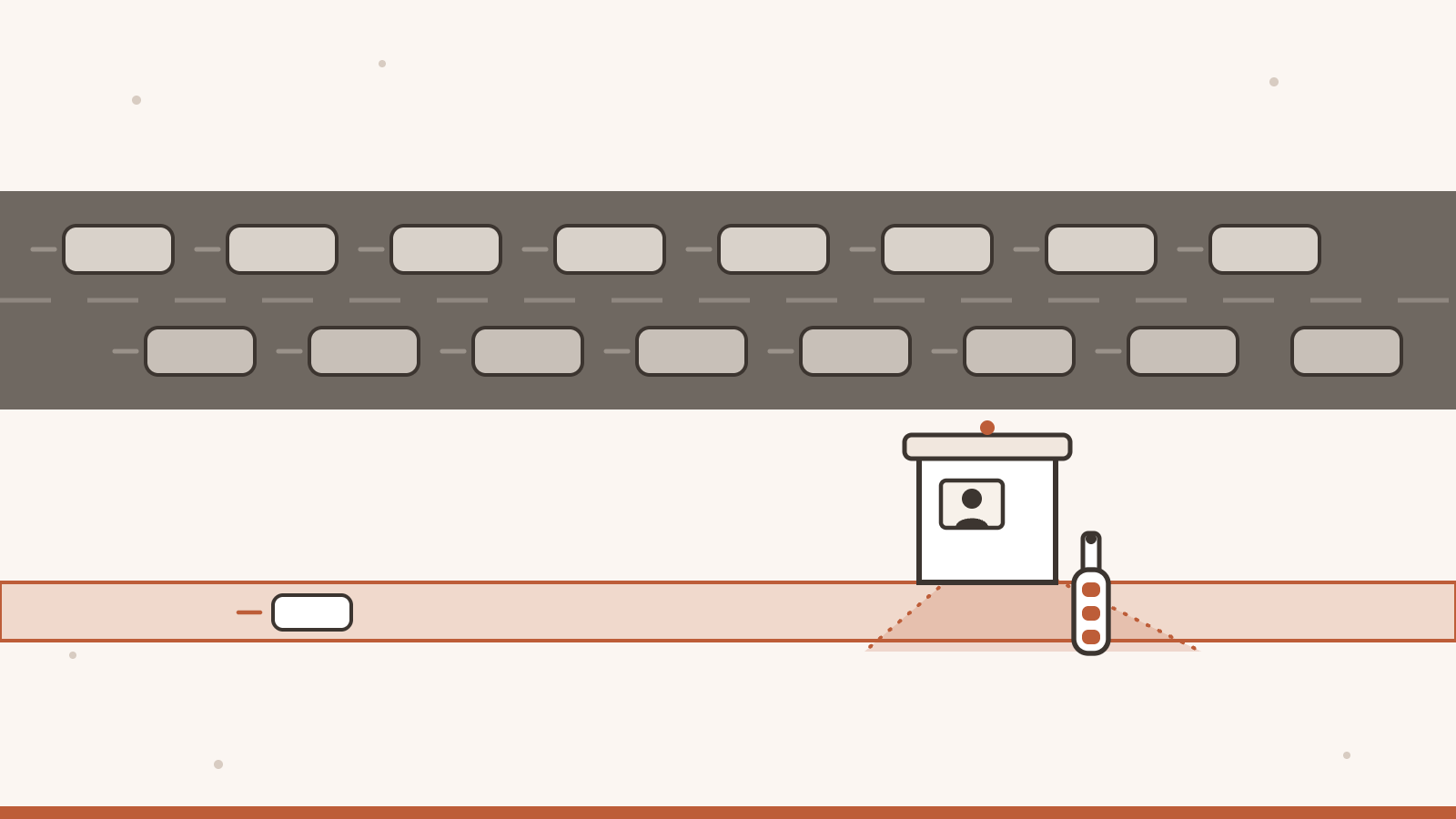
Aztán megnéztem, mi mellett nulla. A legegyszerűbb kép egy őrbódé a kapu mellett. Az őr két sávot lát: egy széles, sűrű sávot, amelyen szinte minden forgalom jön, és egy vékony sávot, amelyen alig megy valaki. A széles sávon jövők teljes joggal érkeznek, ott nincs mit elutasítani. A vékony sávon jönnének azok, akikre a szabályok valójában vonatkoznak, a bérlő-felhasználók, de ők akkor még alig használták a rendszert.
A forgalom eloszlását erre az időszakra nem tudom naplóval igazolni, csak a rendszer felépítéséből következtetek rá. A teljes jogú hozzáférési kulccsal érkező kérést a kapu átengedi, és a naplóba sem írja be, mert a napló csak a nem rendszergazdai kérések döntéseit rögzíti. A valódi felhasználói munkamenetek pedig, amelyek miatt az egész kaput építettem, akkor még alig voltak. A nulla tehát nem azt jelentette, hogy a szabályok jók. Azt jelentette, hogy a kapu alig látott olyat, amit elutasíthatott volna.
A második ok kellemetlenebb volt. A korábbi megfigyelés nem tartós naplóban élt, ezért egy újraindítás megszakíthatta. Az augusztustól októberig tartó időszak így nem bizonyíthatóan összefüggő megfigyelés volt, hanem egy érzés, amelyet számnak hívtam. A hallgatás nem bizonyíték.
Egy pontosítás, mert könnyen félre lehetne érteni: a szerepkör-kapu ebben az időszakban csak jelzett, nem tiltott. A bérlő-határt a jogosultsági réteg és az útvonalankénti bérlő-szűrés együtt tartja, és az élesítés napján talált lelet éppen az utóbbi hiányát mutatta (erről a következő pontban írok). Amit láttam, az csak a szerepkör-kapura vonatkozott.
4. Az élesítés napja
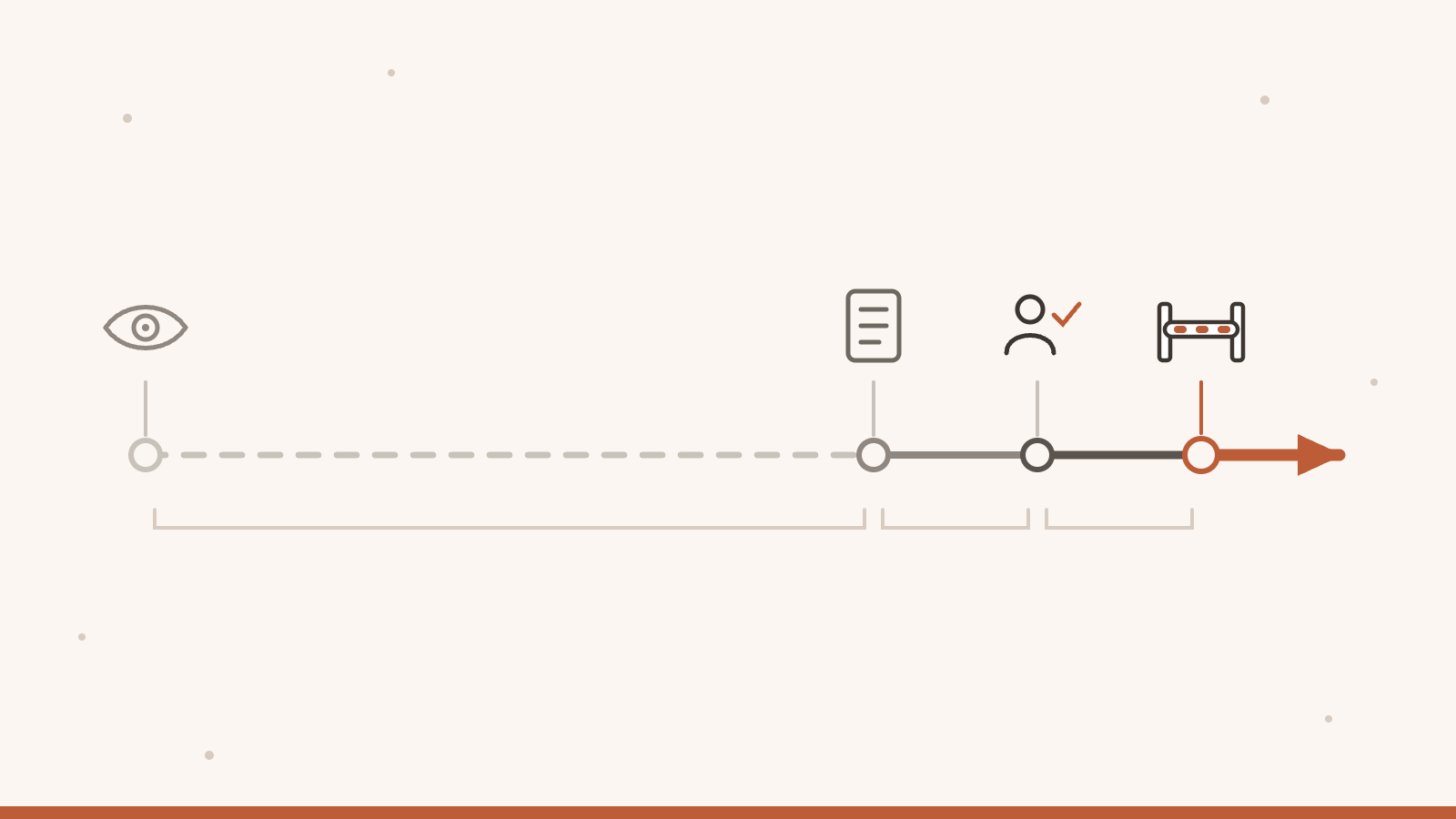
A fordulat 2026. október 3-án jött, egyetlen nap alatt. Reggel elkészült a tartós napló: a kapu minden nem rendszergazdai döntését az adatbázisba írja, az idővel, a bérlővel, a hívó fajtájával, a szerepkörrel, az útvonallal, a kért joggal és a döntéssel. A napló az átengedett kéréseket is rögzíti, mert az „engedélyezve” felirat félrevezető: azt sugallja, hogy a kérést megvizsgálták, pedig lehet, hogy csak azért ment át, mert a kapu nem is nézte. Az adatbázis a naplót harminc napig őrzi. Minden reggel egy figyelő feladat összesíti az előző huszonnégy órát, és itt tanultam egy apróságot, amely nagyobb, mint amilyennek látszik: ha egy ablakban egyetlen sor sincs, a feladat nem azt mondja, hogy „tiszta nap”, hanem azt, hogy „nincs bizonyíték”.
Aztán egy valódi bérlő-felhasználóval végigkattintottam a felületet, ahogyan egy ügyfél tenné, és megnéztem, mit rögzít a kapu. Fél tíz után néhány perccel megjelent az első sor. A hetekig tartó csend után az első valódi próba azonnal mutatott valamit: a bérlő-felhasználó a szervezeti ábrát a bérlőre való szűrés nélkül kapta meg, vagyis az összes ügynök listáját. A felületet tovább járva hasonlót találtam az ügynököket listázó lekérdezéseknél és egy exportnál, amelyet a bérlő-felhasználó letölthetett volna, és amely minden ügynököt kiadott volna neki. Ezt az exportot a második részben is említettem.
A hiba osztálya tanulságos. A szervezeti ábra kérését a jogosultsági réteg már akkor sem találta jogosnak: a napló „elutasítottam volna” jelzésű sort rögzített. A megfigyelő üzemmód azonban nem állította meg, a kérés átment, és a végpont a bérlőre való szűrés nélkül adta ki az ügynököket. A jogosultság és a bérlő-szűrés két külön ellenőrzés: az egyik jól döntött, a másik hiányzott az útvonalból, és megfigyelő üzemmódban semmi nem pótolta. Az exportnál a hiba más volt: a kód története szerint rossz szabálysor alá esett, amely minden szerepnek engedte volna (erről naplóm nincs, csak a kódból tudom). Ezért az ügynököket listázó lekérdezéseket a hívó bérlőjére szűrtem, az exportot pedig csak rendszergazdának tettem elérhetővé. A javítás még aznap délelőtt elkészült, és tizenegy óra körül a napló már azt mutatta, hogy az új szabály az exportokat is elfogja.
A napló aznap három olyan kérést rögzített, amelyet az új szabály elutasított volna: a szervezeti ábrát reggel, két exportot a javítás után, mind egy bérlő-felhasználótól. A szervezeti ábra valódi rést tárt fel, a két export pedig azt mutatta, hogy az új szabály működik. A megfigyelő üzemmód tehát nem volt haszontalan: amint valódi forgalmat kapott, valódi eseteket fogott, és ezek indokolták az élesítést. A „hallgatás nem bizonyíték” lecke legerősebb példája ez: a csend addig tartott, amíg valaki valóban megnyomta a gombokat.
A döntés ezután az enyém volt: az élesítés nem technikai kérdés, hanem tulajdonosi döntés, és tudni kell, mi a visszaút. A visszaút a kód szerint egyetlen sor: a megfigyelő üzemmódra állítás és az újraindítás. Az élesítést aznap este, 20 óra után kapcsoltam be.
Mit jelent ez egy cégnek. A szabály bevezetése nem hit kérdése volt, de nem is hosszú bizonyítás: egy napnyi tartós naplóra és egy valódi próbára épült, amely kimutatott egy rést. Egy cégnél az a különbség a „bekapcsoltuk, és remélhetőleg nem romlik el” és a „tudjuk, mit ellenőriztünk, mielőtt éles lett” között, hogy marad-e nyoma a próbának. Nálam maradt, de rövid időszakról.
5. Az első napok: amikor a tiltás ára kiderült
Az élesítés óta (október 20-i méréssel tizenhét nap) a kapu 39 kérést utasított el. Ezek közül nagyjából húsz szándékos tiltás volt: például egy ügynök olyan adatot próbált olvasni, amelyhez a szerepe nem ad jogot. Kettő egy bérlő-felhasználóé volt, aki adminisztrációs oldalt kért: jogos elutasítás. Nagyjából tizenöt hiba volt a részemről: jogos ügynök-hívás, amelyet a kapu azért tiltott, mert az útvonalnak nem volt sora a táblázatban, és a tartalék, a rendszergazdai jog elutasította. A besorolást az útvonalak alapján magam végeztem, ezért kerek számokat írok; két elutasítást nem soroltam be.
Ez a hiba esetén tiltó üzemmód ára. A rendszer nem engedett egy hívást, amelyet engedni kellett volna, és ezt a naplóból láttam meg, nem egy felhasználói panaszból. Az első javítás október 12-én készült el (a feladattábla, a memória és az üzenetek módosító hívásai), a második október 15-én (az ügynök saját kulcsa írhatott vissza egy képesség-fájlt). Nem kellett visszaállnom megfigyelő üzemmódra, és a két javítás a téves tiltások nagy részét lezárta. A naplóban nem látok bérlő-felhasználó téves kizárását, de ennyire kevés bérlő-forgalomnál ez keveset bizonyít.
A naplóban az élesítés óta nagyjából 17 700 nem rendszergazdai döntés van, ebből kb. 15 800 telemetria-írás, amelyet az ügynökök saját kulcsai küldenek. A naplóban látható kérések nagy többsége tehát gép, nem ember.
Mit jelent ez egy cégnek. A hiba esetén tiltó alapértelmezés biztonságosabb, de ára van: néha jogos hívást is kizár. Az a lényeg, hogy ez látszik: a napló megmutatta, hogy mely hívásokat zártam ki tévesen, és hogy javítottam őket. Egy cégnél nem az a kérdés, lesz-e ilyen hiba, hanem hogy észreveszik-e, és kinek a feladata kijavítani.
6. Ember és ügynök ugyanazon a kapun
A jogosultság nem csak az embereknek szól. Az ügynök is szereplő a rendszerben: ütemez, üzenetet küld, beállítást olvas, és a nevemben dolgozik. Ezért a kérdés, amelyet minden műveletnél feltenni akarok, nem az, hogy „ki kérte”, hanem hogy „kinek a nevében történt”. Ember a saját nevében, ügynök egy ember vagy egy bérlő megbízásából, és a kettőt a naplónak meg kell tudnia különböztetni.
A legkonkrétabb példa az ütemezés. Egy ügynök vagy egy bérlő-felhasználó csak piszkozatot hozhat létre, bérlőnként legfeljebb húsz nyitott feladatot, vagyis piszkozatot vagy felülvizsgálatra várót. Élessé csak bejelentkezett ember teheti, és a rendszer az élesítéskor azt a tartalmat ellenőrzi, amelyet az ember felülvizsgált: ha a felülvizsgálat óta megváltozott, az élesítés nem megy át; a módosítás pedig visszaküldi a feladatot felülvizsgálatra. A korábbi megosztott hozzáférési kulcs rendszergazdai jogú volt, de nem ember. Mindezekre vannak tesztek.
Az azonosságnál még nem tartok ott, ahol szeretnék. Az ügynökök saját hozzáférési kulcsot kapnak, és a szerver az ügynök saját azonosítóját kényszeríti ki az írásoknál: ügynök-kulccsal idegen azonosító nevében nem lehet írni. A főügynök és az üzemeltető nevesített rendszergazdai kulcsot kap, a közös kulcs kivezetésével pedig a feladót ma az ügynök saját kulcsa határozza meg. Amit ma nem állíthatok: hogy az azonosság kikényszerítése teljes.
Ide tartozik a jóváhagyás is. Az olyan műveletet, amely kifelé hat, például egy levélküldést, csak bejelentkezett ember hagyhatja jóvá a felületen: ügynök vagy kulcs nem. A jóváhagyás egyetlen levélre szól, egyszer használható, és csak a kérő ügynök használhatja fel. Azt viszont nem állítom, hogy ez minden jóváhagyásra érvényes: a legtöbb kategóriánál a megadott autonómia-szint csak tanács, nem kapu.
Mit jelent ez egy cégnek. Ha egy ügynök kulcsa elvész vagy visszaélnek vele, az egyetlen ügynök kulcsa vonható vissza, és az ügynök-kulccsal tett írásoknál látszik, ki tette, nem csak az, hogy valaki a közös kulccsal. Egy levélnél a felismert küldési utakon csak akkor megy ki üzenet a cég nevében, ha egy ember pontosan arra a levélre igent mondott a saját belépésével; ez az, amit utólag igazolni lehet. Más jóváhagyási kategóriákra ez még nem igaz (lásd fent).
7. Számokban
Itt is csak azt mérem, ami ellenőrizhető, és mindegyik mellé odaírom a módszert és a korlátját.
Mit mér: mennyi tartós napló állt rendelkezésre az élesítéskor: a napló 2026. október 3-án 07:17-től létezik, az élesítés aznap 20:13-kor történt. Mit nem mér: az előtte lévő időszakot; a kapu megfigyelő üzemmódú bekötésétől (2026. augusztus 24., a kód története szerint) október 3-ig nincs naplóadatom, csak a kód és a beállítás. Mérve: 2026. október 20.
Mit mér: a tartós naplóban a nem rendszergazdai kérések döntéseit október 3. óta. Mit nem mér: a rendszergazdai forgalmat, amelyet a napló nem rögzít, ezért a valódi kérésszám ennél nagyobb. Módszer: a napló sorainak száma döntés szerint. Mérve: 2026. október 20.
Mit mér: a szűk szűrő (a fájlnévben az „rbac”, „authz” vagy „permission” szó szerepel) kb. 270 tesztesetét, 18 fájlban, és a széles szűrő (a tartalomban jogosultsági segédek, ügynök-szerepkör, csak olvasó) kb. 1 550 tesztesetét, 83 fájlban. Mit nem mér: a lefedettséget, és azt, hogy a tesztek le is futnak. Módszer: a tesztfájlok tesztesetsorainak statikus számlálása, nem futtatás. Mérve: 2026. október 20.
8. Az eredeti és az én rendszerem
Összevetést csak ott írok, ahol ellenőriztem. Az „eredeti” oszlop az eredeti projekt fejlesztési ágának 2026. október 18-i állapota: a keresett fogalmak (szerepkör, jog, bérlő-azonosító, ügynök-kulcs) fájlokban való jelenlétét vagy hiányát néztem. Egy más helyen vezetett megoldásról nem tudok, és az eredeti is fejlődik, ezért ez pillanatfelvétel. A „rendszerem” oszlop a megjelenés napjának állapota.
| Téma | Az eredeti | A rendszerem |
|---|---|---|
| Szerepkör-alapú hozzáférés | ○ nincs: szerep-jog modell nincs | ✓ éles: öt szerepkör, 29 jog, a szerver tilt |
| Bérlők elkülönítése | ○ nincs: bérlő-modell nincs | ✓ éles az adatoknál (lásd a második részt) |
| Ügynökönkénti kulcs a közös helyett | ◐ csak tervdokumentum; a közös kulcs működik | ✓ éles: ügynökönkénti kulcs; a közös kulcsot lecseréltem, az ügynökök már nem használják, a régi érték érvénytelen |
| Jóváhagyás-kapuk | ◐ megvan: egy levélre szóló, egyszer használható jóváhagyás | ◐ részben: ezen felül csak-ember kategória, hitelesített döntő, aláírt válasz; a legtöbb kategóriánál a megadott autonómia-szint csak tanács |
| Audit és döntési napló | ◐ általános audit-napló van; döntési napló nincs | ✓ éles: tartós döntési napló és a közös kulcs használatának mérése; a rendszergazdai forgalmat nem rögzíti |
| Hiba esetén tiltó kapuk | ◐ megvan az elv, a romboló parancsokat és a kimenő hálózati forgalmat védő kapuval | ✓ éles: két további kapu: az egyik a titkok olvasását védi, a másik azt, hogy egy ügynök belépést vagy kulcsot hozzon létre, vagy a saját kérését jóváhagyja |
| Titkok védelme a naplóban és a folyamatlistában | ✓ megvan | ✓ éles: nálam későbbi átvétel, de itt már nincs különbség az eredetihez képest |
Mit jelent ez egy cégnek. Az első három sor az, amit egy cég a jogosultságnál először megkérdez, és az eredeti itt nem ad választ. A negyedik, az ötödik és a hatodik sor részleges előny: az alapelv az eredetiben is megvan, én hozzáadtam. A hetedik sor mutatja a határt: ott az eredeti járt előrébb, nálam ma él, és nem állítom magamról az ellenkezőjét.
9. Mit nem old meg ez
Mit nem old meg ez. A szerepkörök egyszerűek, és ezért durvák: öt szerepkör van, tulajdonság-alapú szabály nincs. A kapu a jogot ellenőrzi, azt nem, hogy a válasz csak a hívó bérlőjének adatait tartalmazza-e, erre külön szűrés és külön tesztek valók. A jogosultság az API-t védi, nem az ügynökök futtatását. Egy új útvonal szabály nélkül jogos hívót is kizárhat. A napló nem rögzíti a rendszergazdai forgalmat, és harminc napig őrzi a sorokat. Az azonosság kikényszerítése még nem teljes. A jóváhagyási kategóriák többsége nem kötött a konkrét művelethez. Független átvilágítás nem történt, a mérleg pillanatfelvétel.
10. Ami következik
A sorozat kérdése az, mit ad egy kisvállalkozásnak vagy egy nagyobb cégnek ez a rendszer az eredetihez képest. A jogosultság terén a válasz négy dolog: szerepkör szerint döntő kapu, bérlőnként elkülönített adat, ügynökönként visszavonható kulcs és egy átállás, amelyet egy napnyi tartós napló és egy valódi próba előzött meg. Mindegyiknek megvannak a korlátai, ezeket a 9. pontban leírtam.
Innentől a kapu nem csak figyel, hanem dönt, és az ügynökök is ugyanazon a kapun mennek át, mint az emberek. Csakhogy a szabály, hogy ki mit tehet, egy beállítás, és egy szabály annyit ér, amennyire megbízható az a hely, ahol tárolják. Ezért a következő rész arról szól, hol élnek a beállítások.
Milyen szerepkört hiányolsz a felsorolásból? Egy rövid javaslat elég. Ha hibát látsz, ne tegyél közzé kihasználható részletet. Emailben vagy LinkedInen privátban keress meg (info@jonasgergo.hu, LinkedIn).
English version
In brief, for readers with no background. Access control decides who may do what in a system: who may read, who may write, who may switch on a live action. I first only watched which people the new rule would wrongly lock out, and turned the refusals on only afterwards. The watching, however, was largely blind: the zero did not mean my rules were good.
For weeks I saw no refusals at the gate. I was pleased, and then I realised the number tells me nothing.
At the end of the second part I left it at this: the tenant is in the system, but does not yet know what it is allowed to do. This part is about how I decide who may do what, how I switched it on without wrongly locking anyone out, and why the fact that I saw no refusals for weeks proved nothing.
The series has one question, which I state for the first time in this part: what does a small business or a larger company gain from the fact that I developed the original personal assistant further into my own system? In access control the answer is the following. A company does not start with how much the system can do, but with who may do what with it, and whether it can be said afterwards who did what. The original cannot do this: it has no role model and no tenant separation, and the key per agent exists only as a design document. Mine has them: the server decides by role, separates the data by tenant, gives each agent its own access key instead of a shared one, and writes its decisions to a persistent log. At the end I compare the two in a table, and I also write down where the original is ahead and where I made mistakes along the way.
1. Who may do what
Who you are is settled by your login or your access key. What you may do is settled by access control. The two are not the same: knowing who is at the door does not tell me what to let them do.
The tenant boundary says whose data it is. Access control says what a person may do with it inside that boundary. Nor is this the same thing: even within one tenant, someone who only looks at the interface has different rights from someone who rewrites settings.
My system has five roles. Four are for people: administrator, tenant user, read-only and viewer (these two currently get identical permissions: they can only read, cannot write, cannot decide approvals, and cannot reach the administration pages). The fifth is for machines: it belongs to an agent's own access key. Each role carries permissions, for example "read the schedule" or "write the schedule"; there are 29 permissions in all, 13 of them tied to machines (for example writing telemetry), held only by administrators and agent keys. Every request route has a required permission attached, roughly a hundred rules, and the gate asks one question: does the caller hold it? If a route is missing from the table, the gate asks for administrator rights. I call this failing closed: if I forget to add a row, the system refuses rather than allows. The price of that I describe in section 5.
There are no attribute-based rules, such as "only during working hours" or "only from this country": the model is role-based, which is easy to see and check, but it cannot yet express anything finer. I come back to its limits in section 9.
What this means for a company. Colleagues and customers reach functions according to their role, and it is not the buttons of the interface that enforce this but the server. Whether a response contains only their own data is a separate matter of filtering (see sections 4 and 9). This is the first question a risk manager asks, and access control is a customary basic element in the spirit of the EU cybersecurity expectations (for example NIS2) as well; this does not mean my system complies with them. The original system does not offer this.
2. Why I watched first and refused only afterwards
A wrong refusal does damage too: it locks out a legitimate user who has no idea what they broke. So I started the new gate in observe-only mode. In that mode the gate works out the same decision but does not refuse: it lets the request through and records "I would have refused this". If after some time there are no such records, I can think my rules are right and switch refusals on.
That sounds sensible. In my case it was misleading.
3. The zero that told me nothing
I wired the gate in on 24 August 2026 in observe-only mode, and it ran that way until 3 October. During that time the number I was watching was zero: I saw no request that the gate would have refused. I was pleased. What that number was worth I cannot check afterwards, because I have no log data for that period: the persistent log started only on the morning of 3 October.
Then I looked at what the zero was next to. The simplest picture is a guard booth beside a gate. The guard sees two lanes: a wide, busy lane carrying almost all the traffic, and a thin lane where hardly anyone passes. Those on the wide lane arrive with full rights, so there is nothing to refuse. Those who would come through the thin lane are the people the rules are really about, the tenant users, but at that point they hardly used the system.
I cannot confirm the distribution of the traffic for that period from a log; I infer it from how the system is built. A request that arrives with a full-rights access key is let through by the gate and is not logged, because the log records only the decisions on non-administrator requests. And real user sessions, the reason I built the whole gate, hardly existed yet. So the zero did not mean my rules were good. It meant the gate had hardly seen anything it could have refused.
The second reason was more uncomfortable. The earlier observation did not live in a persistent log, so a restart could interrupt it. The stretch from August to October was therefore not provably continuous observation but a feeling that I called a number. Silence is not evidence.
One clarification, because this could easily be misread: in that period the role gate only flagged, it did not refuse. The tenant boundary is held by the permission layer and the per-route tenant filtering together, and the finding on the day of switch-on showed exactly the lack of the latter (I write about it in the next section). What I saw concerned only the role gate.
4. The day I switched it on
The turn came on 3 October 2026, within a single day. In the morning the persistent log was finished: the gate writes every non-administrator decision to the database, with the time, the tenant, the kind of caller, the role, the route, the permission required and the decision. The log records the requests that were let through as well, because the label "permitted" is misleading: it suggests the request was examined, when it may only have passed because the gate was not looking. The database keeps the log for thirty days. Every morning a monitoring task summarises the previous twenty-four hours, and here I learned something small that matters more than it looks: if a window contains not a single row, the task does not say "clean day" but "no evidence".
Then I clicked through the interface with a real tenant user, the way a customer would, and looked at what the gate recorded. A few minutes after half past nine the first row appeared. After weeks of silence, the first real run showed something at once: the tenant user received the organisation chart without any filtering by tenant, that is, the list of all agents. Going further through the interface I found a similar flaw in the queries that list agents, and a similar one in an export that the tenant user could have downloaded and that would have handed over every agent. I mentioned this export in the second part as well.
The class of the flaw is instructive. The permission layer did not find the organisation-chart request legitimate even then: the log recorded a "would have refused" row. But observe-only mode did not stop it; the request went through, and the endpoint handed out the agents without any filtering by tenant. The permission and the tenant filter are two separate checks: one decided correctly, the other was missing from the route, and in observe-only mode nothing made up for it. The export was a different flaw: according to the code history it fell under the wrong rule row, which would have allowed every role (I have no log of that, I know it only from the code). So I filtered the queries that list agents by the caller's tenant and made the export available to administrators only. The fix was done that same morning, and by about eleven o'clock the log already showed that the new rule would catch the exports too.
That day the log recorded three requests the new rule would have refused: the organisation chart in the morning and two exports after the fix, all from a tenant user. The organisation chart exposed a real gap, and the two exports showed that the new rule works. Observe-only mode was therefore not useless: as soon as it got real traffic, it caught real cases, and those justified switching on. It is the strongest example of the lesson "silence is not evidence": the silence lasted only until someone actually pressed the buttons.
The decision was then mine: switching on is not a technical question but an owner's decision, and you have to know the way back. The way back is, according to the code, a single line: set observe-only mode and restart. I switched the gate on that evening, after 8 p.m.
What this means for a company. Introducing the rule was not a matter of faith, but it was not long proof either: it rested on one day of persistent log and one real trial that exposed a gap. For a company the difference between "we switched it on and hope it does not break" and "we know what we checked before it went live" is whether the trial leaves a trace. Mine did, but for a short period.
5. The first days: when the price of refusing showed
Since switch-on (measured on 20 October, seventeen days) the gate has refused 39 requests. About twenty of them were deliberate refusals: for example an agent tried to read data that its role gives it no right to. Two came from a tenant user who asked for an administration page: a correct refusal. Roughly fifteen were my mistake: legitimate agent calls that the gate refused because the route had no row in the table, and the fallback, administrator rights, turned them down. I classified them by route myself, so I give round numbers; two refusals I did not classify.
That is the price of failing closed. The system refused a call it should have allowed, and I saw it in the log, not in a user complaint. The first fix came on 12 October (the calls that modify the task board, memory and messages), the second on 15 October (an agent's own key could write a capability file back). I did not have to go back to observe-only mode, and the two fixes closed most of the wrongful refusals. I see no wrongful lock-out of a tenant user in the log, but with so little tenant traffic that proves little.
Since switch-on the log holds roughly 17,700 non-administrator decisions, about 15,800 of them telemetry writes sent by the agents' own keys. The great majority of the requests visible in the log are therefore machines, not people.
What this means for a company. The default of refusing on error is safer, but it has a price: sometimes it locks out a legitimate call too. What matters is that this is visible: the log showed which calls I wrongly locked out, and that I fixed them. For a company the question is not whether such an error will occur, but whether it is noticed, and whose job it is to fix it.
6. Humans and agents through the same gate
Access control is not only for people. An agent is an actor in the system too: it schedules, sends messages, reads settings and works on my behalf. So the question I want to ask on every action is not "who asked" but "on whose behalf did it happen". A person on their own behalf, an agent on behalf of a person or a tenant, and the log has to be able to tell the two apart.
The most concrete example is scheduling. An agent or a tenant user can only create a draft, at most twenty open tasks per tenant (drafts or tasks waiting for review). Only a signed-in person can make it live, and at that moment the system checks the content the person actually reviewed: if it has changed since the review, switching it live fails; and any modification sends the task back to review. The former shared access key had administrator rights but was not a person. There are tests for all of this.
On identity I am not yet where I want to be. Agents get their own access keys, and the server enforces the agent's own identifier on writes: with an agent's key you cannot write in another identity's name. The main agent and the operator get named administrator keys, and with the shared key retired, the sender is now set by the agent's own key. What I cannot claim today: that the enforcement of identity is complete.
Approval belongs here too. An action that reaches outside, such as sending an email, can be approved only by a signed-in person in the interface: not by an agent or a key. An approval covers a single email, can be used once, and only the requesting agent can use it. I do not claim this holds for every approval, though: for most categories the autonomy level is only advice, not a gate.
What this means for a company. If an agent's key is lost or abused, the key of that single agent can be revoked, and for writes made with an agent's key it can be seen who did them, not just that somebody did it with the shared key. For an email, on the recognised sending paths a message leaves in the company's name only if a person said yes to exactly that email with their own login; that is what can be proved afterwards. For other approval categories this is not yet true (see above).
7. In numbers
Here too I measure only what can be verified, and next to each number I give the method and its limit.
What it measures: how much persistent log existed at switch-on: the log has existed since 07:17 on 3 October 2026, and I switched on at 20:13 that day. What it does not measure: the time before it; from wiring the gate in, in observe-only mode (24 August 2026, according to the code history) to 3 October I have no log data, only the code and the configuration. Measured: 20 October 2026.
What it measures: the decisions on non-administrator requests in the persistent log since 3 October. What it does not measure: administrator traffic, which the log does not record, so the real number of requests is higher. Method: the number of log rows by decision. Measured: 20 October 2026.
What it measures: the narrow filter (the words "rbac", "authz" or "permission" in the file name) with about 270 test cases in 18 files, and the broad filter (permission helpers, the agent role, read-only in the content) with about 1,550 test cases in 83 files. What it does not measure: coverage, or whether the tests actually pass. Method: a static count of the test-case lines in the test files, not a run. Measured: 20 October 2026.
8. The original and my system
I write a comparison only where I have checked. The "original" column is the state of the original project's development branch on 18 October 2026: I looked at the presence or absence of the relevant concepts (role, permission, tenant identifier, agent key) in the files. I know of no solution kept elsewhere, and the original keeps developing, so this is a snapshot. The "my system" column is the state on the day of publication.
| Topic | The original | My system |
|---|---|---|
| Role-based access control | ○ none: no role and permission model | ✓ live: five roles, 29 permissions, the server refuses |
| Tenant separation | ○ none: no tenant model | ✓ live for the data (see the second part) |
| A key per agent instead of a shared one | ◐ a design document only; the shared key works | ✓ live: a key per agent; I replaced the shared key, the agents no longer use it, and the old value is invalid |
| Approval gates | ◐ present: an approval for a single email, usable once | ◐ partly: in addition a human-only category, an authenticated decider, a signed response; for most categories the level is only advice |
| Audit and decision log | ◐ a general audit log exists; no decision log | ✓ live: a persistent decision log and a measurement of shared-key use; it does not record administrator traffic |
| Gates that refuse on error | ◐ the principle is there, with a gate for destructive commands and a gate for outgoing network traffic | ✓ live: two further gates: one protects the reading of secrets, the other stops an agent from creating logins or keys or approving its own request |
| Protecting secrets in the log and the process list | ✓ present | ✓ live: a later adoption on my side, but there is no difference from the original here any more |
What this means for a company. The first three rows are what a company asks about access control first, and the original gives no answer here. The fourth, fifth and sixth rows are a partial advantage: the principle is present in the original too, and I added to it. The seventh row shows the limit: there the original was ahead, mine is live today, and I do not claim otherwise about myself.
9. What this does not solve
What this does not solve. The roles are simple, and therefore coarse: there are five roles and no attribute-based rules. The gate checks the permission; it does not check whether the response contains only the caller's tenant data, which needs separate filtering and separate tests. Access control protects the API, not the running of the agents. A new route without a rule can lock out a legitimate caller too. The log does not record administrator traffic and keeps rows for thirty days. The enforcement of identity is not yet complete. Most approval categories are not bound to the specific action. No independent audit has taken place; the scorecard is a snapshot.
10. What comes next
The question of the series is what this system gives a small business or a larger company compared with the original. In access control the answer is four things: a gate that decides by role, data separated by tenant, a key per agent that can be revoked, and a switch-over preceded by one day of persistent log and one real trial. Each has its limits, which I described in section 9.
From now on the gate does not just watch, it decides, and agents go through the same gate as people. But the rule about who may do what is a setting, and a rule is only as reliable as the place where it is stored. That is why the next part is about where the settings live.
Which role is missing from the list? A short suggestion is enough. If you spot a flaw, please do not publish an exploitable detail. Contact me privately by email or on LinkedIn (info@jonasgergo.hu, LinkedIn).