Amikor a fájljaim összekapcsolódnak
külső tudás a memóriagráfban
external knowledge in the memory graph
An English version of this article follows below. Jump to the English version.
A tudásom szét van szórva. Van egy régi elemzésem egy lokális mappában, egy jegyzet a Google Drive-on, egy dokumentum egy vállalati SharePointon, és külön a fejemben az összefüggés, hogy ezek ugyanarról szólnak. Az AI-asszisztensem memóriája viszont eddig csak azt ismerte, amit én magam elmondtam neki. Ez a cikk arról szól, hogyan nyitottam meg ezt a memóriát a külső fájljaim felé, és miért nem elég a fájlokat behordani, ha az a cél, hogy tényleg összekapcsolódjanak.
1. A probléma: a fájltár nem tudásbázis
Egy tanácsadói vagy vezetői munkában a tudás nem egy helyen keletkezik. Elemzések, jegyzetek, korábbi projektek dokumentumai gyűlnek fel, több eszközön, több formátumban. Ezeket be lehet másolni egy mappába, és onnantól kereshetők. De egy fájltár és egy tudásbázis között van egy lényeges különbség: a fájltárban a dokumentumok egymás mellett állnak, a tudásbázisban egymásra hivatkoznak.
Az én olvasatomban ez a különbség dönti el, hogy egy rendszer segít-e a gondolkodásban, vagy csak tárol. Ha behordok egy új dokumentumot, és a rendszer nem tudja, hogy az kapcsolódik egy fél éve írt elemzésemhez, akkor a dokumentum ott van, de a felismerés elveszett. Éppen a felismerés, hogy két dolog összefügg, az, amiért egy memóriának egyáltalán értéke van. Ezért a célom nem az volt, hogy az asszisztensem lásson több fájlt, hanem hogy a behordott fájl bekerüljön abba a szemantikus hálóba, amit már felépítettem benne.
2. A folyamat: fájltól a memóriáig
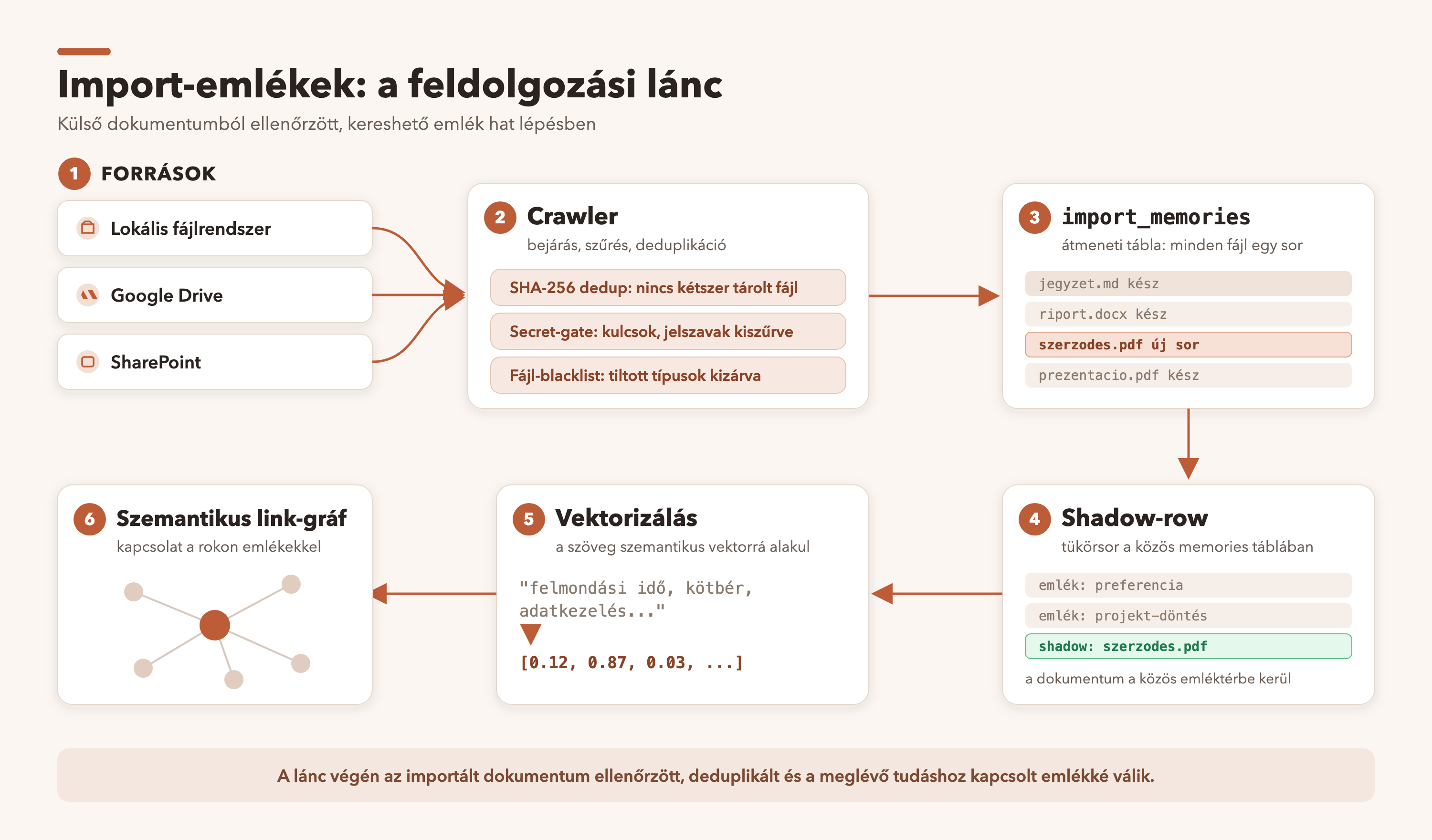
A feature három forrást ismer: a lokális fájlrendszert, a Google Drive-ot és a vállalati SharePointot. Egy háttérben futó bejáró rendszeres időközönként végignézi a megadott forrásokat, és a talált fájlokat egy több lépcsős folyamaton engedi át. Az első lépcső a deduplikáció: minden fájl tartalmából ujjlenyomat készül, és ha az nem változott az előző futás óta, a rendszer nem importálja újra, csak frissíti a nyilvántartást. A második lépcső a biztonsági szűrés, amiről a negyedik fejezetben külön írok. A harmadik lépcső után a fájl bekerül egy import-nyilvántartásba, majd innen kap helyet a fő memóriarendszerben, vektorizálódik, és megjelenik a memóriagráfon.
3. Architektúra: az árnyék-sor
3.1 Miért nem elég egy külön tábla?
Az importált dokumentumok először egy saját táblába kerülnek. Ez logikus, mert az importnak megvan a saját nyilvántartása: melyik forrásból jött, mikor látták utoljára, mi a tartalmi ujjlenyomata. A probléma akkor jelentkezett, amikor ezeket a bejegyzéseket be akartam kötni a meglévő memóriagráfba. A gráf szemantikus kapcsolatait tároló réteg és a vektoros keresőindex egyaránt egész számú belső azonosítót vár, az import-nyilvántartás saját azonosítói viszont szöveges kulcsok. A kettő közvetlenül nem illeszkedett össze.
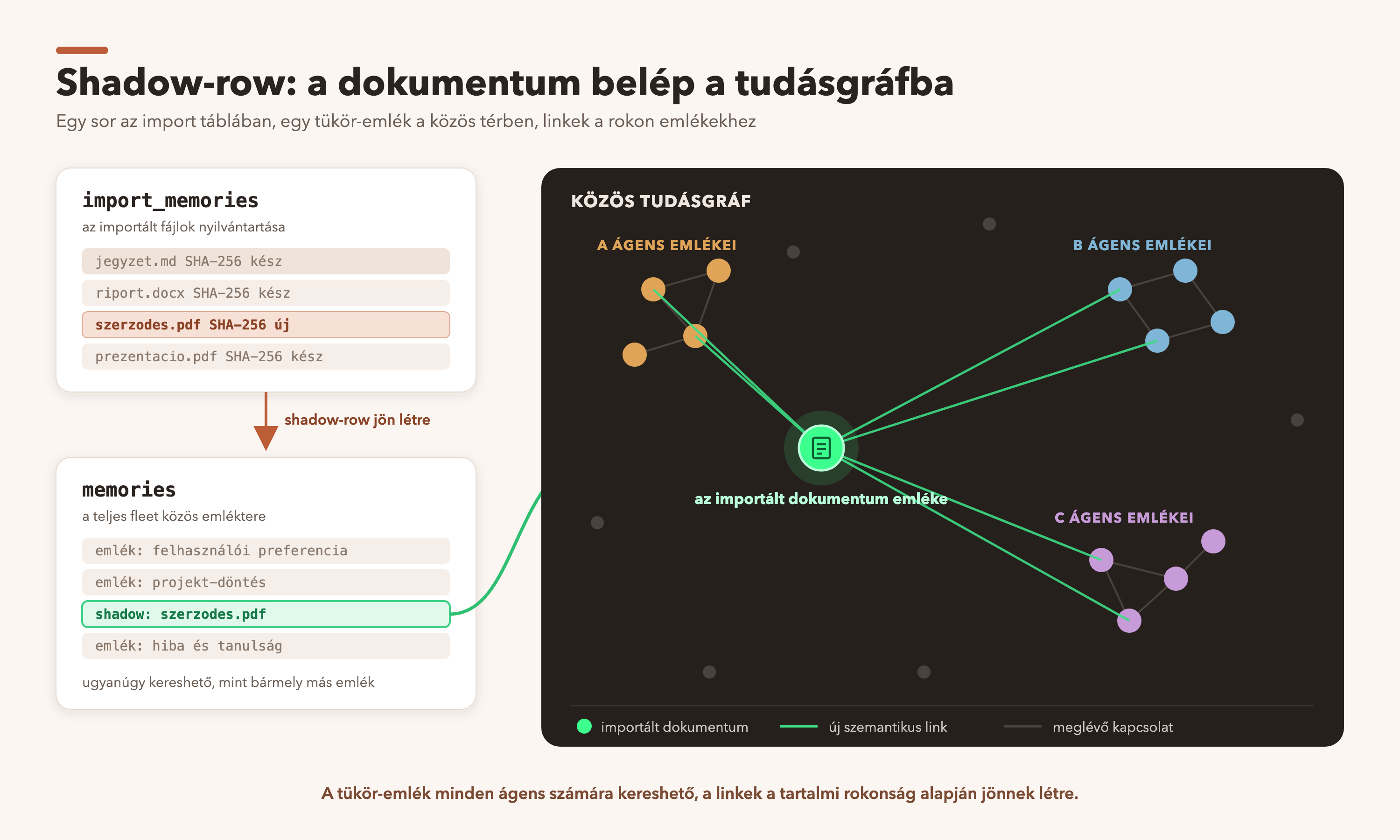
A megoldás egy úgynevezett árnyék-sor lett. Minden importált dokumentumhoz keletkezik egy bejegyzés a fő memória-táblában is, amely megkapja a rendszer egész számú azonosítóját, és ez lesz a gráf csomópontja. Az import-nyilvántartás bejegyzése ezzel az árnyék-sorral van összekötve. Ez nem felesleges duplikálás, hanem adaptáció. A meglévő infrastruktúrát, a vektorizálást, a kulcsszavas indexelést, a napi kapcsolat-karbantartást nem kellett újraírni, az importált tartalom egyszerűen becsatlakozik hozzá. A memóriagráfon az importált elemek külön, jól megkülönböztethető színnel jelennek meg, és az idővonalon is szerepelnek a keletkezésük ideje szerint.
3.2 A kulcs: keresztkapcsolás a teljes tudásbázissal
Itt jött a legérdekesebb rész, és egyben az, ami elsőre nem működött. A rendszerben a memóriák alapból korlátozott láthatóságúak: az egyes ügynökök csak a saját és a kifejezetten megosztott emlékeiket látják a keresőn keresztül. Ez a normál esetben helyes, egyfajta hozzáférés-védelem. Egy importált dokumentumnak viszont pont az ellenkezője a célja: annak a teljes tudásbázissal kell kapcsolódnia, függetlenül attól, melyik ügynök melyik emléke áll szemantikailag közel hozzá.
Amikor először behordtam egy dokumentumot, a rendszer megjelenítette a gráfon, de egyetlen kapcsolat nélkül, magányos pontként. Utánaszámoltam, és kiderült, hogy a dokumentum tartalmilag nagyon is közel áll egy meglévő elemzésemhez, a hasonlóság magas volt. Két akadály állt az összekapcsolás útjában. Az egyik a láthatósági szűrő volt, amely a más ügynökökhöz tartozó rokon emlékeket kizárta. A másik egy küszöbérték, amely a kapcsolat létrejöttéhez az általánosnál szigorúbb hasonlóságot követelt meg, olyat, amit a valós, tartalmilag rokon dokumentumok éppen csak nem értek el.
Ez a rész jó emlékeztető volt arra, hogy egy fél megoldás nem fél eredmény, hanem nulla eredmény. A keresztkapcsolás engedélyezése önmagában nem volt elég, amíg a küszöb túl magas maradt. Mindkettőt együtt kellett feloldani ahhoz, hogy az első él egyáltalán létrejöjjön.
A megoldás az lett, hogy az importált soroknál a keresés megkerüli a láthatósági szűrőt, és a teljes bázison keres, egy fogalmilag is indokoltan lazább hasonlósági küszöbbel. A keresztkapcsolat természete ugyanis lazább, mint egy ügynök saját emlékei közötti kapcsolat: itt éppen az a cél, hogy a különböző területek tudása találkozzon. Az eredmény az lett, amit vártam. A behordott dokumentum automatikusan összekapcsolódott a korábbi, tartalmilag rokon elemzésemmel. Nem én mondtam meg, hogy összefüggenek, a rendszer ismerte fel.
4. Adatkezelés: amit be sem szabad engedni
Egy AI-memóriának, amely külső fájlokat olvas be, a legfontosabb tulajdonsága nem az, hogy mit tud, hanem hogy mit nem enged be. Ezért a tartalom szűrése nem opció, hanem alapfeltétel. Az import előtt a rendszer kiszűri a hitelesítő adatokat, a tokeneket, a bankszámlaszám jellegű sorokat, a jelszó-előtaggal kezdődő sorokat és a privát kulcs blokkokat. A szűrő az eredeti fájlt nem módosítja, és a kiszűrt adatot nem is naplózza, egyszerűen kihagyja. Az elv egyszerű: a rendszernek sosem kell megtudnia azt, amit szűrnie kellene.
Erre jön egy második réteg, a fájltípus szerinti tiltás. Bizonyos kiterjesztések a tartalmuktól függetlenül tiltottak, mint a kulcs- és tanúsítvány-fájlok, és az ismert titok-fájlnév minták. Ez nem a tartalomszűrő alternatívája, hanem a párja: ha az egyik elnéz valamit, a másik blokkolja. Vállalati kontextusban ez az első védelmi vonal.
A vállalati SharePoint külön óvatosságot kíván. A rendszer itt csak olvasási jogot kér, írásra nem. Ez szükséges, de nem elégséges. Egy vállalati tárhelyen lehet titoktartás alá eső, különleges adatkategóriájú, vagy belső szabályzat által védett tartalom, és ezt a technológia nem ismeri fel. Ezért a feature egyértelmű figyelmeztetéssel jár: ha valaki vállalati forrást ad meg, előbb ellenőrizze, hogy a szervezete adatvédelmi szabályzata engedi-e a tartalom személyes AI-rendszerbe másolását. A felelősség a felhasználóé, az eszköz azt teszi, amire utasítják.
Végül minden import auditálva van. Egy külön napló rögzíti, ki, honnan, mikor importált, hány fájl került be, és mennyi maradt ki, miért. Ez kétirányú kontroll: a megfelelőséget segíti, mert utólag igazolható, mi történt, és a felhasználónak is átláthatóságot ad arról, mit tud róla a rendszer. A behordás és a kiürítés sem automatikus döntés: mindkettő jóváhagyáshoz kötött. Az AI memóriája nem nőhet és nem ürülhet ki a tudtom nélkül.
5. Egy mérnöki tanulság: a migráció csapdája
A fejlesztés közben belefutottam egy hibába, amit érdemes megosztani, mert általánosabb tanulságot hordoz. Az árnyék-sorok visszamenőleges létrehozását először az adatbázis-migrációba tettem. A migráció olyan lépés, amely a séma változásait vezeti át, és a rendszer indulásának korai szakaszában fut. A baj az volt, hogy a fő memória-táblán ült egy korábbi telepítésből egy aktív adatbázis-eszköz, amely minden beszúráskor a vektoros keresőmodult hívta. Ez a modul viszont az indulásnak csak egy jóval későbbi pontján töltődik be. A migrációs beszúrás így egy még be nem töltött modult próbált használni, és a szerver induláskor összeomlott, majd újra és újra megpróbált elindulni.
A javítás visszatekintve kézenfekvő volt. A migráció mostantól csak a séma változását tartalmazza, magát a visszamenőleges feltöltést pedig kivettem belőle, és futásidejű kóddá alakítottam, amely csak a vektoros modul betöltése után fut. Az általános szabály, amit ebből levontam: egy migrációs lépés sosem érinthet olyan táblát, amelyre egy aktív, virtuális modulra támaszkodó adatbázis-eszköz mutat. A migráció ideje túl korai ahhoz, hogy a rendszer minden képessége rendelkezésre álljon.
Az őszinteség kedvéért ezt is leírom, mert az ilyen hibák a valódi fejlesztés részei. A rendszer egy rövid időre összeomlott, de a helyreállítás automatikus volt, és adat nem veszett el. A tanulság nem az, hogy nem szabad hibázni, hanem hogy a helyreállítás és a visszafordíthatóság legyen mindig beépítve, mielőtt élesben próbálod ki.
6. Összefoglalás
| Szempont | Sima fájltár | Szemantikus memóriagráf |
|---|---|---|
| Kapcsolatok | A fájlok egymás mellett állnak | A dokumentumok egymásra hivatkoznak |
| Új elem behordása | Bekerül, de elszigetelt marad | Automatikusan a rokon tudáshoz kapcsolódik |
| Keresés | Fájlnév és szöveg szerint | Jelentés szerint is, a teljes bázison |
| Titkok kezelése | A fájl tartalma úgy kerül be, ahogy van | Import előtti tartalom- és típus-szűrés |
| Átláthatóság | Nincs nyilvántartás a behordásról | Auditált import, jóváhagyáshoz kötve |
| Megjelenítés | Mappák és lista | Színkódolt csomópont a gráfon és az idővonalon |
A feature lényege nem az, hogy több fájlt lát az asszisztensem. Az, hogy a behordott fájl nem magányos pontként landol, hanem beköt abba a szemantikus hálóba, amit hosszú ideje építek. A legjobb visszaigazolás az volt, amikor egy frissen importált dokumentum magától rátalált egy fél éve írt elemzésemre. Nem kerestem, nem címkéztem, a rendszer felismerte az összefüggést. Egy tudásbázis pontosan ettől lesz több egy fájltárnál.
A cikk a cett/marveen fork memóriarendszerének 2026-08-21-i állapotát tükrözi.
Van kérdésed, vagy beszélgetnél a témáról? Írj emailben: info@jonasgergo.hu, vagy keress meg LinkedInen.
English version
My knowledge is scattered. There is an old analysis of mine in a local folder, a note on Google Drive, a document on a company SharePoint, and, separately, in my head, the connection that these are about the same thing. The memory of my AI assistant, however, has so far known only what I told it myself. This article is about how I opened this memory up to my external files, and why it is not enough to bring the files in if the goal is for them to genuinely connect.
1. The problem: a file store is not a knowledge base
In consulting or management work, knowledge does not arise in one place. Analyses, notes, documents of earlier projects pile up, on several devices, in several formats. They can be copied into a folder, and from then on they are searchable. But there is an essential difference between a file store and a knowledge base: in a file store the documents stand side by side, in a knowledge base they refer to one another.
In my reading, this difference decides whether a system helps thinking or merely stores. If I bring in a new document and the system does not know that it connects to an analysis I wrote half a year ago, then the document is there, but the recognition is lost. It is precisely the recognition that two things are related that gives a memory any value at all. So my aim was not for my assistant to see more files, but for the file I bring in to enter the semantic network I have already built in it.
2. The process: from file to memory
The feature supports three sources: the local file system, Google Drive and the company SharePoint. A crawler running in the background goes through the given sources at regular intervals, and passes the files it finds through a multi-stage process. The first stage is deduplication: a fingerprint is made from the content of every file, and if it has not changed since the previous run, the system does not import it again; it only updates the register. The second stage is security filtering, which I write about separately in the fourth section. After the third stage the file enters an import register, from there it gets a place in the main memory system, is vectorised, and appears on the memory graph.
3. Architecture: the shadow row
3.1 Why is a separate table not enough?
Imported documents first go into a table of their own. This is logical, because the import has its own register: which source it came from, when it was last seen, what its content fingerprint is. The problem arose when I wanted to tie these entries into the existing memory graph. The layer that stores the semantic connections of the graph and the vector search index both expect integer internal identifiers, while the import register's own identifiers are text keys. The two did not fit together directly.
The solution was a so-called shadow row. For every imported document an entry is also created in the main memory table, which receives the system's integer identifier, and this becomes the node of the graph. The entry of the import register is linked to this shadow row. This is not needless duplication but adaptation. The existing infrastructure, the vectorisation, the keyword indexing, the daily maintenance of links, did not have to be rewritten, the imported content simply plugs into it. On the memory graph the imported items appear in a separate, clearly distinguishable colour, and they are also on the timeline according to the time they were created.
3.2 The key: cross-linking with the whole knowledge base
Here came the most interesting part, and also the one that did not work at first. In the system, memories have restricted visibility by default: individual agents see, through search, only their own memories and those explicitly shared. In the normal case this is right, a kind of access protection. For an imported document, however, the aim is exactly the opposite: it has to connect to the whole knowledge base, regardless of which agent's memory is semantically close to it.
When I first brought in a document, the system showed it on the graph, but without a single connection, as a lonely dot. I checked the numbers, and it turned out that the document was in fact very close in content to an existing analysis of mine, the similarity was high. Two obstacles stood in the way of linking them. One was the visibility filter, which excluded related memories belonging to other agents. The other was a threshold value which required a stricter similarity than usual for a connection to form, one that real, topically related documents just failed to reach.
This part was a good reminder that half a solution is not half a result but no result. Enabling cross-linking alone was not enough as long as the threshold stayed too high. Both had to be relaxed together for the first edge to form at all.
The solution was that for imported rows the search bypasses the visibility filter and searches the whole base, with a looser similarity threshold, which is also justified conceptually. The nature of a cross-link is looser than that of a connection between an agent's own memories: here the very aim is for the knowledge of different areas to meet. The result was what I expected. The document I brought in automatically connected to my earlier, topically related analysis. I did not say that they were related; the system recognised it.
4. Data handling: what must not be allowed in at all
For an AI memory that reads in external files, the most important property is not what it knows but what it does not let in. That is why filtering the content is not an option but a basic condition. Before import the system filters out credentials, tokens, lines resembling bank account numbers, lines beginning with a password marker and private-key blocks. The filter does not modify the original file, and does not even log the filtered data, it simply leaves it out. The principle is simple: the system should never get to learn what it ought to filter out.
On top of this comes a second layer, the ban by file type. Certain extensions are forbidden regardless of their content, such as key and certificate files, and known secret file-name patterns. This is not an alternative to the content filter but its pair: if one overlooks something, the other blocks it. In an enterprise context this is the first line of defence.
The company SharePoint needs particular caution. Here the system asks for read access only, not for write. This is necessary but not sufficient. On a company store there may be content under confidentiality, special-category data, or protected by internal policy, and the technology does not recognise this. That is why the feature comes with a clear warning: whoever specifies a company source should first check whether their organisation's data-protection policy allows the content to be copied into a personal AI system. The responsibility is the user's, the tool does what it is told.
Finally, every import is audited. A separate log records who imported, from where, when, how many files came in, and how many were left out, and why. This is a two-way control: it helps compliance, because what happened can be demonstrated afterwards, and it also gives the user transparency about what the system knows about them. Bringing in and clearing out are not automatic decisions either: both are subject to approval. The memory of the AI can neither grow nor be emptied without my knowledge.
5. An engineering lesson: the trap of the migration
During development I ran into a bug worth sharing, because it carries a more general lesson. I first put the backfilling the shadow rows into the database migration. A migration is a step that carries out the schema changes, and it runs early in system start-up. The trouble was that on the main memory table sat an active database trigger (an automatic action attached to the table) from an earlier installation, which called the vector search module at every insert. That module, however, is loaded only at a much later point in start-up. So the migration's insert tried to use a module that was not yet loaded, and the server crashed at start-up, then kept trying to restart.
In hindsight, the fix was obvious. The migration now contains only the schema change, and I took the backfill out of it and turned it into runtime code, which runs only after the vector module has loaded. The general rule I drew from this: a migration step must never touch a table to which a database trigger relying on an active virtual module points. The time of the migration is too early for all the capabilities of the system to be available.
In the interest of honesty I write this down too, because such mistakes are part of real development. The system crashed for a short while, but the recovery was automatic, and no data was lost. The lesson is not that one must not make mistakes, but that recovery and reversibility should always be built in before you try something live.
6. Summary
| Aspect | A plain file store | A semantic memory graph |
|---|---|---|
| Connections | The files stand side by side | The documents refer to one another |
| Bringing in a new item | It gets in, but stays isolated | It automatically connects to related knowledge |
| Search | By file name and text | By meaning as well, across the whole base |
| Handling of secrets | The content goes in as it is | Content and type filtering before import |
| Transparency | No register of what was brought in | Audited import, subject to approval |
| Display | Folders and a list | A colour-coded node on the graph and the timeline |
The point of the feature is not that my assistant sees more files. It is that the file I bring in does not land as a lonely dot but plugs into the semantic network I have been building for a long time. The best confirmation was when a freshly imported document found, on its own, an analysis I had written half a year earlier. I did not look for it, I did not tag it, the system recognised the connection. That is exactly what makes a knowledge base more than a file store.
This article reflects the state of the memory system of the cett/marveen fork on 21 August 2026.
Do you have a question, or would you like to talk about the topic? Write to me by email: info@jonasgergo.hu, or find me on LinkedIn.